

Introduction: What is a Web Scraping Framework?
A web scraping framework organizes tasks such as requesting pages, following links, extracting fields and exporting records. The tools below serve different roles: Scrapy is a crawling framework; Beautiful Soup parses documents; Selenium, Playwright and Puppeteer automate browsers; hosted services provide managed execution or retrieval. They are not interchangeable, and none guarantees access to every website. Our definition of web scraping explains the distinction between retrieving a page, extracting fields and validating the result.
- Introduction: What is a Web Scraping Framework?
- 1. Scrapy (Python) – Crawling Framework
- 2. BeautifulSoup (Python) – HTML and XML Parser
- 3. Selenium – Browser Automation
- 4. Playwright – Browser Automation Across Engines
- 5. Puppeteer (JavaScript) – Chrome and Firefox Automation
- 6. Scrapy Splash (Python) – Separate Rendering Service
- 7. Goutte (PHP) – Deprecated; Review BrowserKit
- 8. Apify – Hosted Automation Platform
- 9. ScraperAPI – Managed Retrieval Service
- 10. Octoparse (No-Code Scraping)
- Comparison Table: Tool Roles and Selection Checks
- Final Thoughts: Choosing the Right Web Scraping Framework
Why Use a Web Scraping Framework?
Choose the components your source actually needs: an HTTP client for retrieval, a parser for HTML, a crawler for queues and pagination, or browser automation when rendering and interaction are necessary. Plan validation, storage and failure handling separately. Browser automation is not a built-in CAPTCHA solution or permission to access restricted data.
Technical review — October 2, 2026: this article retains its original 2025 publication title and URL. The descriptions below have been checked against project documentation. They are selection guidance, not a performance ranking or a claim that every tool is suitable for every target.
Before choosing a tool, inspect an authorized sample response and define required fields, pagination limits, update frequency and acceptance checks. Start with our beginner scraping guide for the extraction workflow, and use the scraping troubleshooting guide to separate access, rendering and parsing failures.
1. Scrapy (Python) – Crawling Framework
📌 Website: Scrapy.org
📌 Consider for: Python projects that need crawl scheduling, extraction and item processing
Key Features:
- Built-in crawling engine for multi-page scraping
- Concurrent requests with project-specific limits; throughput depends on the site and configuration
- Downloader middleware for request and response processing; CAPTCHA solving is not a built-in crawler guarantee
- Feed exports include JSON, JSON Lines and CSV; database writes require an item pipeline or another integration
📖 Further Reading: Scrapy feed export documentation
2. BeautifulSoup (Python) – HTML and XML Parser
📌 Website: Beautiful Soup documentation
📌 Consider for: Parsing HTML or XML that has already been retrieved
Key Features:
- Document navigation and search through a parsed HTML or XML tree
- Extracts text, tables, and links from web pages
- Does not fetch pages or execute JavaScript itself; a separate HTTP client or browser supplies the document
📖 Further Reading: Beautiful Soup parser guide
3. Selenium – Browser Automation
📌 Website: Selenium.dev
📌 Consider for: Authorized browser workflows requiring interaction, particularly in existing WebDriver projects
Key Features:
- Automates browser interactions (clicks, scrolls, logins)
- Works with Chrome, Firefox, Edge WebDrivers
- Headless operation depends on the browser; benchmark the actual workflow rather than assuming it will be faster
📖 Further Reading: Official Selenium WebDriver documentation
4. Playwright – Browser Automation Across Engines
📌 Website: Playwright.dev
📌 Consider for: Browser workflows using Chromium, Firefox or WebKit. Playwright WebKit is not the installed Safari browser
Key Features:
- Works with multiple browser engines
- Use explicit locators and readiness checks for the workflow; do not assume built-in stealth or universal access
- Supports screenshots; check the browser-specific requirements for PDF generation
📖 Further Reading: Playwright browser support documentation
5. Puppeteer (JavaScript) – Chrome and Firefox Automation
📌 Website: Puppeteer.dev
📌 Consider for: JavaScript projects that need controlled browser rendering and interaction
Key Features:
- Controls Chrome or Firefox; headless mode is available
- Extracts JavaScript-rendered content
- Provides screenshot and PDF APIs; verify feature support for the chosen browser
📖 Further Reading: Puppeteer official documentation
6. Scrapy Splash (Python) – Separate Rendering Service
📌 Website: Scrapy-Splash
📌 Consider for: An existing Scrapy pipeline that has been tested with a separate Splash rendering service
Key Features:
- Sends rendering requests to the Splash HTTP API
- Requires a running Splash instance in addition to the Python integration package
- Check target-page compatibility and maintenance requirements before choosing the renderer
📖 Further Reading: Scrapy-Splash installation and configuration
7. Goutte (PHP) – Deprecated; Review BrowserKit
📌 Website: Goutte GitHub
📌 Status: Deprecated. The project repository was archived in April 2023; its maintainers direct users to Symfony BrowserKit’s HttpBrowser
Key Features:
- Legacy PHP wrapper around Symfony components for HTTP-based document navigation
- The successor BrowserKit component supports request, cookie and form workflows
- Review Symfony BrowserKit and HttpClient for a new HTTP-based PHP implementation; JavaScript rendering needs a different component
📖 Further Reading: Symfony BrowserKit migration destination
8. Apify – Hosted Automation Platform
📌 Website: Apify.com
📌 Consider for: Running documented automation programs, called Actors, on a managed platform
Key Features:
- Provides hosted Actor execution and storage; you still need to configure the job and validate its output
- Offers SDKs for JavaScript and Python; runtime dependencies are specific to the Actor
- Offers public and private Actors; review each Actor’s documentation, version, output schema and costs
📖 Further Reading: Apify Actor documentation
9. ScraperAPI – Managed Retrieval Service
📌 Website: ScraperAPI
📌 Consider for: Retrieving permitted URLs through a managed API; successful access is not guaranteed
Key Features:
- Accepts a target URL and API key; the standard retrieval service returns the fetched document
- Can be called from an application over HTTP; select the API mode and response format your pipeline needs
- Structured endpoints have defined target and schema support; validate coverage, errors and billing for your use case
📖 Further Reading: ScraperAPI integration documentation
10. Octoparse (No-Code Scraping)
📌 Website: Octoparse.com
📌 Consider for: Teams that prefer a visual extraction workflow and can maintain its task configuration
Key Features:
- A visual task interface can reduce hand-written code; page changes still require troubleshooting
- Test pagination and dynamic-page behavior against the specific task rather than assuming complete coverage
- Documented export formats include CSV, JSON and Excel; check setup and plan requirements for integrations
📖 Further Reading: Octoparse export documentation
Comparison Table: Tool Roles and Selection Checks
| Tool | Role and selection check |
|---|---|
| Scrapy | Python crawling framework. Check queue, extraction and export requirements. |
| Beautiful Soup | Python parser. Supply HTML or XML through a separate retrieval step. |
| Selenium | Browser automation. Check browser drivers and wait conditions. |
| Playwright | Browser automation. Check engine support and page readiness. |
| Puppeteer | JavaScript browser automation. Check Chrome or Firefox feature support. |
| Scrapy-Splash | Scrapy rendering integration. Operate and test the separate Splash service. |
| Goutte | Deprecated PHP library. Review Symfony BrowserKit for a replacement. |
| Apify | Hosted Actor platform. Review the selected Actor’s schema, runtime and costs. |
| ScraperAPI | Managed retrieval API. Check endpoint coverage, errors and usage costs. |
| Octoparse | Visual extraction tool. Test the configured task and required export path. |
Final Thoughts: Choosing the Right Web Scraping Framework
Choose a web scraping framework by testing the complete collection task, not just whether the homepage loads:
Start with the simplest sufficient retrieval method. If an authorized API or HTML response contains the required fields, browser rendering may be unnecessary. If an allowed interaction is required, test browser automation. Add crawl scheduling, storage and monitoring according to the project scope; choosing a tool does not establish data completeness.
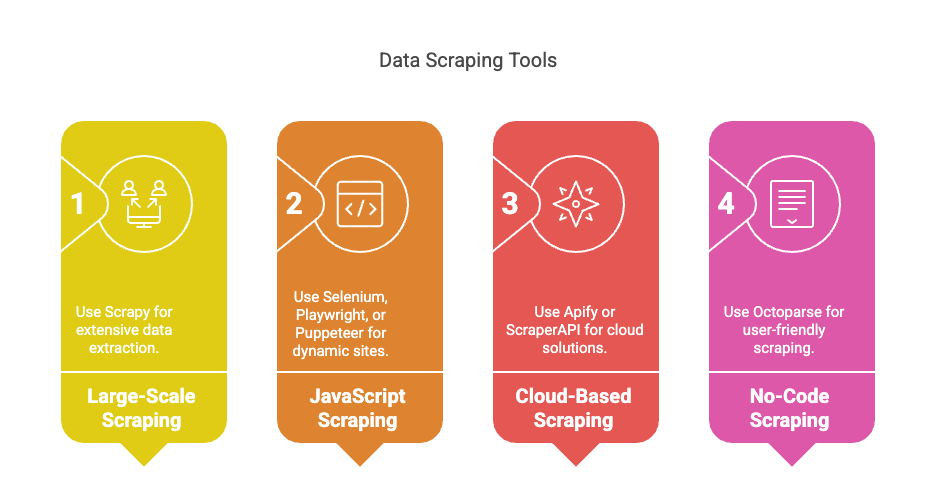
A small acceptance exercise: prepare 20 authorized sample pages with expected identifiers and required fields, including a paginated case and a missing-value case. If a trial returns 19 pages but only 17 have correct required fields, request success is 19/20 = 95%, while validated page coverage is 17/20 = 85%. These are fictional figures, not a benchmark for any tool. Log the failed and incomplete cases separately instead of counting every HTTP success as usable data.
For each candidate, record the tool version, source scope, completed pages, unique records, missing fields, elapsed time and operating cost. Repeat under comparable conditions and inspect changed-page behavior before expanding the collection. Use the service pilot checklist when evaluating a managed provider.
📩 Need professional web scraping solutions? Contact Easy Data for custom-built scrapers.
Leave a Reply