

If you’ve been using web scraping for e-commerce for a while, you’ve probably come across web scraping problems such as IP blocking, failed data retrieval, slow-running scrapers, and frequent instances of incorrect or missing data. However, if you understand the root cause of each problem, you can resolve them all. The guide below is designed to help you do just that.
- Most web scraping problems come from 4 core areas: anti-bot systems, poor scraper architecture, low data quality, and legal constraints and the most common issues include: IP bans, JavaScript rendering, DOM changes, duplicate data, and rate limiting
- The root cause is rarely the code itself, but how the scraping system is designed
- To fix these problems:
- Simulate real browser behavior (don’t act like a bot)
- Design a clear pipeline (crawl → parse → store)
- Clean and validate data from the start
- At scale, building your own scraper becomes hard to maintain and costly compared to using a professional solution
In short: reliable web scraping depends on system design, not just code.
Overview of Common Web Scraping Problems
Based on experience scraping e-commerce websites for multiple real-world projects in Southeast Asia, Easy Data has observed that web scraping problems usually revolve around 4 main groups, each affecting the system in its own way:
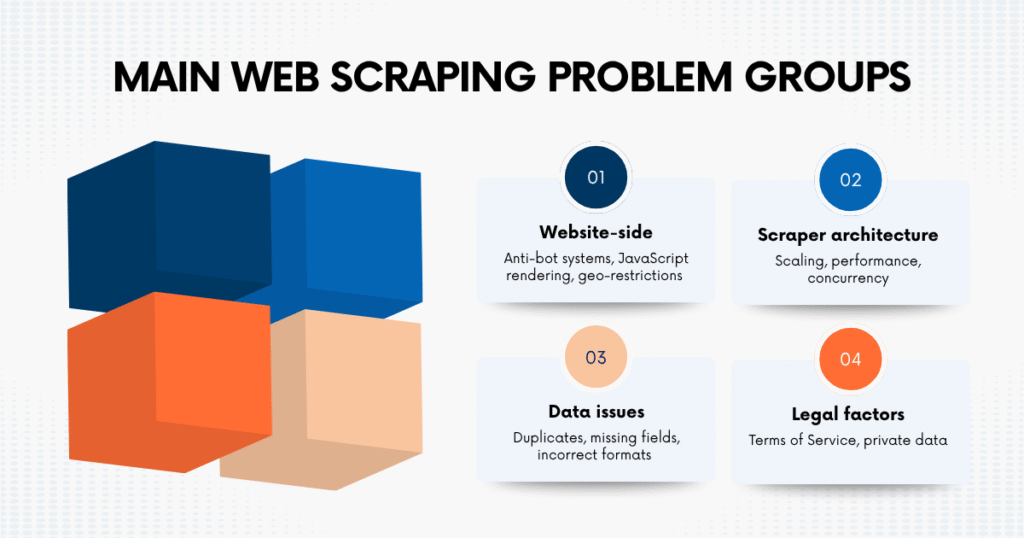
- Website-side issues: anti-bot systems, JavaScript rendering, geo-restrictions
- Scraper architecture issues: scaling, performance, concurrency
- Data issues: duplicates, missing fields, incorrect formats
- Legal factors: Terms of Service, private data
| Web Scraping Problem Group | Difficulty | When It Happens | How It Affects | Recommended Approach |
| Website-level issues | High | When crawling dynamic or protected websites (Shopee, Lazada, TikTok Shop) | Data cannot be retrieved or scraper gets blocked → pipeline stops | Simulate real browser behavior, render JavaScript, control crawl rate |
| Scraper architecture issues | High | When moving from small test to large-scale crawling | System becomes slow, unstable, or fails at scale → cannot maintain data flow | Use async scraping, queues, and separate pipeline stages |
| Data-related issues | Medium | After scraping raw data from multiple pages or sources | Data becomes unreliable → leads to incorrect analysis and decisions | Normalize, deduplicate, validate schema before storing |
| Legal & compliance issues | Medium | When scraping without clear rules or governance | Risk of being blocked or violating policies → long-term operational risk | Only scrape public data, follow ToS, define clear data usage scope |
Understanding these groups helps you predict issues before they happen, design the system correctly from the beginning, and most importantly, avoid having to “fix the same issue again and again.”
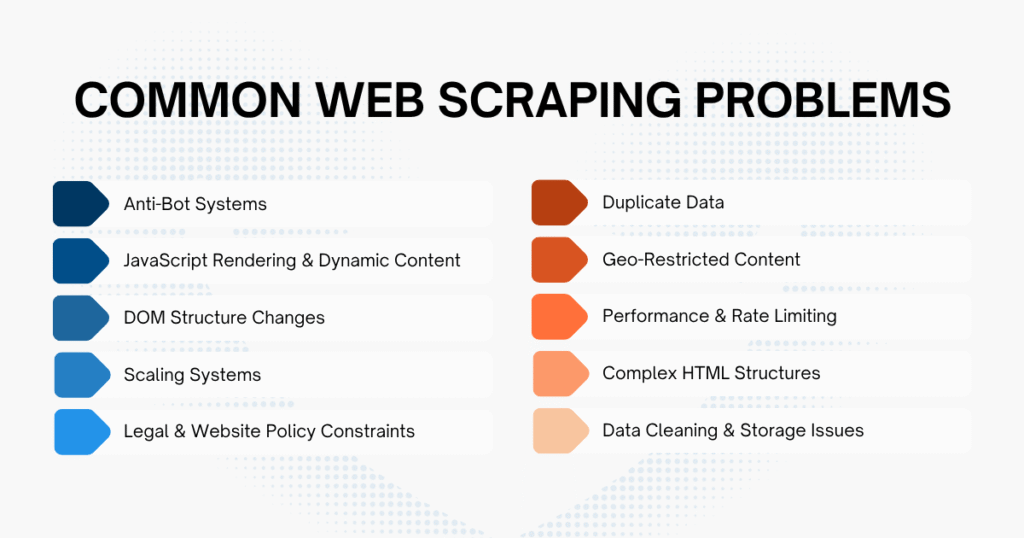
Top 10 Web Scraping Problems And How to Fix Them
During the process of web scraping, issues can appear at any stage. The key is to identify the problem correctly and handle it in the right way.
The guide below summarizes the 10 most common web scraping problems, following the actual workflow of a real scraping system. You can use it as a checklist to debug your current system or as a foundation when designing a pipeline from scratch.
1. Anti-Bot Systems (IP Ban, CAPTCHA, Fingerprinting)
When you first run it, everything is usually quite smooth: data comes in steadily, requests are stable, and there are no significant errors.
But after a short time:
- Requests start to fail
- The page asks for CAPTCHA
- Or worse, your IP gets completely blocked
The easiest sign to recognize: the code still runs normally, but you can no longer get data because the website has “recognized that you are not a real user”.
Causes:
- Sending requests too fast → looks like a bot
- Accessing too many URLs continuously
- Not following robots.txt
- Request headers don’t look like a real browser
- Accessing data that requires login
- Using headless browser, but fingerprint is exposed
How to handle:
- Reduce crawl speed, don’t spam requests
- Add retry + reasonable delay
- Make requests more “human-like” (headers, behavior)
- Prioritize scraping public data only
- Respect robots.txt and protection mechanisms
Example code: check robots.txt before scraping
Copied!from urllib.robotparser import RobotFileParser def can_scrape(base_url: str, target_url: str, user_agent: str) -> bool: robots_parser = RobotFileParser() robots_parser.set_url(f"{base_url}/robots.txt") robots_parser.read() return robots_parser.can_fetch(user_agent, target_url) base_url = "https://example.com" target_url = "https://example.com/products" user_agent = "MyResearchBot" if can_scrape(base_url, target_url, user_agent): print("The URL is allowed for crawling.") else: print("The URL is blocked by robots.txt.")
Example code: polite request with delay and retry
Copied!import time import random import requests from requests.adapters import HTTPAdapter from urllib3.util.retry import Retry session = requests.Session() retry_strategy = Retry( total=3, backoff_factor=2, status_forcelist=[429, 500, 502, 503, 504], allowed_methods=["GET"] ) adapter = HTTPAdapter(max_retries=retry_strategy) session.mount("http://", adapter) session.mount("https://", adapter) session.headers.update({ "User-Agent": "MyResearchBot/1.0 (+contact@example.com)", "Accept": "text/html,application/xhtml+xml", "Accept-Language": "en-US,en;q=0.9" }) def fetch_html(url: str): time.sleep(random.uniform(2, 5)) response = session.get(url, timeout=15) if response.status_code == 429: print("Rate limited. Reduce crawling speed.") return None response.raise_for_status() return response.text
2. JavaScript Rendering & Dynamic Content
A situation that easily makes you “doubt yourself”: you inspect and see full data, but when running the scraper, nothing shows up.
At this point, many people think the code is wrong, but the real issue lies in how the website works.
- Returned HTML is almost empty
- No product name, no price
- But in the browser everything still displays normally
Causes:
- Website uses React / Vue
- Data loads after page render
- Content only appears when scrolling
- DOM changes after load
How to handle:
- Use Playwright / Selenium
- Wait for elements to appear (don’t use hard sleep)
- Get HTML after rendering is complete
- Parse the rendered HTML
Example code: render the website with Playwright and extract HTML
Copied!from playwright.sync_api import sync_playwright def get_rendered_html(url: str) -> str: with sync_playwright() as playwright: browser = playwright.chromium.launch(headless=True) page = browser.new_page( user_agent="MyResearchBot/1.0 (+contact@example.com)" ) page.goto(url, wait_until="networkidle", timeout=60000) rendered_html = page.content() browser.close() return rendered_html
Example code: parse rendered HTML
Copied!from bs4 import BeautifulSoup html = get_rendered_html("https://example.com/products") soup = BeautifulSoup(html, "html.parser") products = [] for product_card in soup.select(".product-card"): name_element = product_card.select_one(".product-name") price_element = product_card.select_one(".product-price") products.append({ "name": name_element.get_text(strip=True) if name_element else None, "price": price_element.get_text(strip=True) if price_element else None }) print(products)
3. DOM Structure Changes
This is a very “annoying” web scraping problem because it doesn’t show clear errors.
No crash, no exception, but data gradually becomes incorrect (e.g., price shifts, missing product name, or returning all “none”). Just a small frontend change can make all your selectors “useless” immediately.
Causes:
- Website updates UI
- A/B testing
- CSS class changes
- Elements get renamed
How to handle:
- Avoid depending on “random” classes
- Use more stable selectors
- Add fallback selectors
- Monitor output to detect early
Example code: fallback selector
Copied!from bs4 import BeautifulSoup def extract_product_name(html: str): soup = BeautifulSoup(html, "html.parser") selectors = [ '[data-testid="product-title"]', "h1.product-title", "h1", 'meta[property="og:title"]' ] for selector in selectors: element = soup.select_one(selector) if element: if element.name == "meta": return element.get("content", "").strip() return element.get_text(strip=True) return None
Example code: detect broken selectors
Copied!def validate_scraping_result(items): if not items: raise ValueError("No items found. The DOM structure may have changed.") items_without_names = [ item for item in items if not item.get("name") ] missing_ratio = len(items_without_names) / len(items) if missing_ratio > 0.3: raise ValueError("Too many missing product names. The selector may be broken.")
4. Scaling Systems
The most obvious sign: the more URLs you need to crawl, the slower the system becomes, timeouts happen continuously, and requests become unstable.
Causes:
- Sequential requests
- No queue
- No retry
- No status tracking
How to handle:
- Use async to run in parallel
- Limit concurrency (avoid being blocked)
- Separate crawl/parse/store
- Use queue to manage jobs
Example code: async HTML scraping with concurrency limits
Copied!import asyncio import aiohttp urls = [ "https://example.com/page-1", "https://example.com/page-2", "https://example.com/page-3" ] async def fetch_html(session, url): async with session.get(url, timeout=20) as response: response.raise_for_status() return await response.text() async def main(): headers = { "User-Agent": "MyResearchBot/1.0 (+contact@example.com)" } connector = aiohttp.TCPConnector(limit=5) async with aiohttp.ClientSession( headers=headers, connector=connector ) as session: tasks = [fetch_html(session, url) for url in urls] results = await asyncio.gather(*tasks, return_exceptions=True) for url, result in zip(urls, results): if isinstance(result, Exception): print(f"Failed to fetch {url}: {result}") else: print(f"Fetched {url}: {len(result)} characters") asyncio.run(main())
5. Legal & Website Policy Constraints
Many teams only focus on “getting the data” and forget about compliance, leading to being blocked, limited data access, or worse, not being able to continue scraping.
Causes:
- Violating Terms of Service
- Scraping private data
- Not checking robots.txt
How to handle:
- Check robots.txt
- Read the website’s Terms of Service
- Avoid scraping personal data without a valid legal basis
- Avoid login-protected content without permission
- Do not bypass CAPTCHA, paywalls, or access controls
- Crawl only public and permitted content
Example code: filter URLs before adding them to the crawl queue
Copied!from urllib.robotparser import RobotFileParser class RobotsChecker: def __init__(self, base_url: str, user_agent: str): self.base_url = base_url.rstrip("/") self.user_agent = user_agent self.parser = RobotFileParser() self.parser.set_url(f"{self.base_url}/robots.txt") self.parser.read() def is_allowed(self, url: str) -> bool: return self.parser.can_fetch(self.user_agent, url) robots_checker = RobotsChecker( base_url="https://example.com", user_agent="MyResearchBot" ) url = "https://example.com/products" if robots_checker.is_allowed(url): print("Add URL to the crawl queue.") else: print("Skip URL because it is not allowed by robots.txt.")
6. Duplicate Data
This web scraping problem is very common but often overlooked. The dataset may look complete, but when analyzing carefully:
- One product appears multiple times
- Average price becomes incorrect
- Item count is inflated
This directly affects decisions based on data, especially in pricing or competitor tracking.
Causes:
- Pagination
- URLs with tracking params
- Multiple URLs for the same product
How to handle:
- Normalize URLs
- Deduplicate by ID
- Remove tracking params
Example code: normalize URLs
Copied!from urllib.parse import urlparse, parse_qsl, urlencode, urlunparse TRACKING_PARAMETERS = { "utm_source", "utm_medium", "utm_campaign", "utm_term", "utm_content", "fbclid", "spm" } def normalize_url(url: str) -> str: parsed_url = urlparse(url) filtered_query = [ (key, value) for key, value in parse_qsl(parsed_url.query) if key not in TRACKING_PARAMETERS ] normalized_url = parsed_url._replace( scheme=parsed_url.scheme.lower(), netloc=parsed_url.netloc.lower(), query=urlencode(filtered_query), fragment="" ) return urlunparse(normalized_url)
Example code: deduplicate items
Copied!seen_items = set() def is_new_item(item): product_id = item.get("product_id") product_url = normalize_url(item.get("url", "")) dedupe_key = product_id or product_url if dedupe_key in seen_items: return False seen_items.add(dedupe_key) return True
7. Geo-Restricted Content
The sign is very clear: the same URL returns different data each time you scrape. For example:
- Different prices by country
- Products only appear in certain regions
- Language, currency change
Causes:
- Website detects location
- Region-based pricing
- Language-based content
How to handle:
- Clearly define the region when crawling
- Store currency together
- Compare data within the same region
Example code: store region metadata
Copied!from datetime import datetime, timezone def build_product_record(product, region, language): return { "product_id": product["product_id"], "name": product["name"], "price": product["price"], "currency": product["currency"], "region": region, "language": language, "scraped_at": datetime.now(timezone.utc).isoformat() } record = build_product_record( product={ "product_id": "SKU123", "name": "Wireless Mouse", "price": 199000, "currency": "VND" }, region="VN", language="en-US" ) print(record)
8. Performance & Rate Limiting
If after some time scraping becomes slower, you frequently get HTTP 429, more timeouts, or inconsistent data, your system is being rate-limited or overloaded.
Causes:
- Too many requests
- No caching
- Retry too fast
How to handle:
- Limit crawling speed
- Use exponential backoff
- Cache HTML responses
- Re-crawl only necessary URLs
- Prioritize important URLs
Example code: retry with exponential backoff
Copied!import time import random import requests def fetch_with_backoff(url, max_attempts=4): for attempt in range(1, max_attempts + 1): try: response = requests.get( url, timeout=15, headers={ "User-Agent": "MyResearchBot/1.0 (+contact@example.com)" } ) if response.status_code == 429: wait_time = (2 ** attempt) + random.uniform(0, 1) print(f"Rate limited. Waiting {wait_time:.2f} seconds.") time.sleep(wait_time) continue response.raise_for_status() return response.text except requests.RequestException as error: if attempt == max_attempts: raise error wait_time = (2 ** attempt) + random.uniform(0, 1) print(f"Request failed. Retrying in {wait_time:.2f} seconds.") time.sleep(wait_time) return None
Example code: cache HTML responses
Copied!from requests_cache import CachedSession session = CachedSession( cache_name="html_cache", expire_after=3600 ) response = session.get( "https://example.com/products", headers={ "User-Agent": "MyResearchBot/1.0 (+contact@example.com)" } ) print("Loaded from cache:", response.from_cache) html = response.text
9. Complex HTML Structures
Not every website “lays out” data in an easy-to-scrape way. When facing complex HTML:
- Selectors seem correct
- Code runs normally
- But data is wrong, missing, or taken from the wrong place
Causes:
- Too many nested layers → selector becomes inaccurate
- Repeated components → easy to select the wrong element
- Real data is in script/JSON, but you scrape HTML
- DOM changes based on state (hover, click, load more…)
How to handle:
- Inspect carefully multiple times, not just one element
- Prefer extracting from JSON in <script> or API (if available)
- Write more “reliable” selectors
- Validate data after scraping (don’t trust 100%)
Example code: parse JSON-LD from HTML
Copied!import json from bs4 import BeautifulSoup def extract_json_ld(html: str): soup = BeautifulSoup(html, "html.parser") script_elements = soup.select('script[type="application/ld+json"]') structured_data = [] for script_element in script_elements: try: data = json.loads(script_element.string) structured_data.append(data) except (TypeError, json.JSONDecodeError): continue return structured_data
Example code: extract product cards from nested HTML
Copied!from bs4 import BeautifulSoup def extract_products(html: str): soup = BeautifulSoup(html, "html.parser") products = [] for product_card in soup.select(".product-card"): name_element = product_card.select_one(".product-card__name") price_element = product_card.select_one(".product-card__price") link_element = product_card.select_one("a[href]") products.append({ "name": name_element.get_text(strip=True) if name_element else None, "price": price_element.get_text(strip=True) if price_element else None, "url": link_element["href"] if link_element else None }) return products
10. Data Cleaning & Storage Issues
Scraping data does not mean you already have “usable” data. Raw data is usually very “dirty”. Examples:
- Price: “1.200.000đ” → cannot calculate immediately
- Product name: extra spaces, strange characters
- Fields sometimes exist, sometimes not, inconsistent format
If not handled carefully, this web scraping problem will strongly affect the final result: incorrect analysis, wrong calculations, wrong dashboard display.
Causes:
- Different formats across pages
- Website changes format without notice
- No normalization step
- Storing raw data without validation
How to handle:
- Clean data right after scraping
- Normalize format
- Handle missing data
- Validate before storing
- Design clear storage
Example code: clean price and validate product data
Copied!import re from pydantic import BaseModel, HttpUrl, ValidationError class Product(BaseModel): product_id: str name: str price: int url: HttpUrl source: str def clean_price(price_text: str) -> int: digits_only = re.sub(r"[^\d]", "", price_text) if not digits_only: raise ValueError("Invalid price value.") return int(digits_only) raw_item = { "product_id": "SKU123", "name": " Wireless Mouse ", "price": "199,000 VND", "url": "https://example.com/product/sku123", "source": "example.com" } try: product = Product( product_id=raw_item["product_id"], name=raw_item["name"].strip(), price=clean_price(raw_item["price"]), url=raw_item["url"], source=raw_item["source"] ) print(product.model_dump()) except ValidationError as error: print("Invalid product data:", error)
Example code: store data in SQLite
Copied!import sqlite3 connection = sqlite3.connect("products.db") connection.execute(""" CREATE TABLE IF NOT EXISTS products ( product_id TEXT PRIMARY KEY, name TEXT NOT NULL, price INTEGER NOT NULL, url TEXT NOT NULL, source TEXT NOT NULL, scraped_at TEXT DEFAULT CURRENT_TIMESTAMP ) """) def save_product(product): connection.execute(""" INSERT INTO products (product_id, name, price, url, source) VALUES (?, ?, ?, ?, ?) ON CONFLICT(product_id) DO UPDATE SET name = excluded.name, price = excluded.price, url = excluded.url, source = excluded.source, scraped_at = CURRENT_TIMESTAMP """, ( product["product_id"], product["name"], product["price"], str(product["url"]), product["source"] )) connection.commit()
How Web Scraping Problems Impact Business Decisions
Web scraping problems are not just technical issues. In practice, even a small error in your scraping pipeline can quietly affect how your business makes decisions. For example:
A team tracks competitor pricing to optimize their own pricing strategy. But the dataset contains duplicate entries → the average price is skewed → leading to incorrect pricing decisions.
Or:
Data is delayed by just 1–2 hours → the team misses a flash sale window → and loses a key competitive advantage.
The pattern is simple: If your data is not accurate or not timely, your decisions are unlikely to be correct.
When Should You Use Data Scraping Services?
If you are only working on a small project (few products, few keywords, low crawl frequency), building your own scraping system is entirely reasonable.
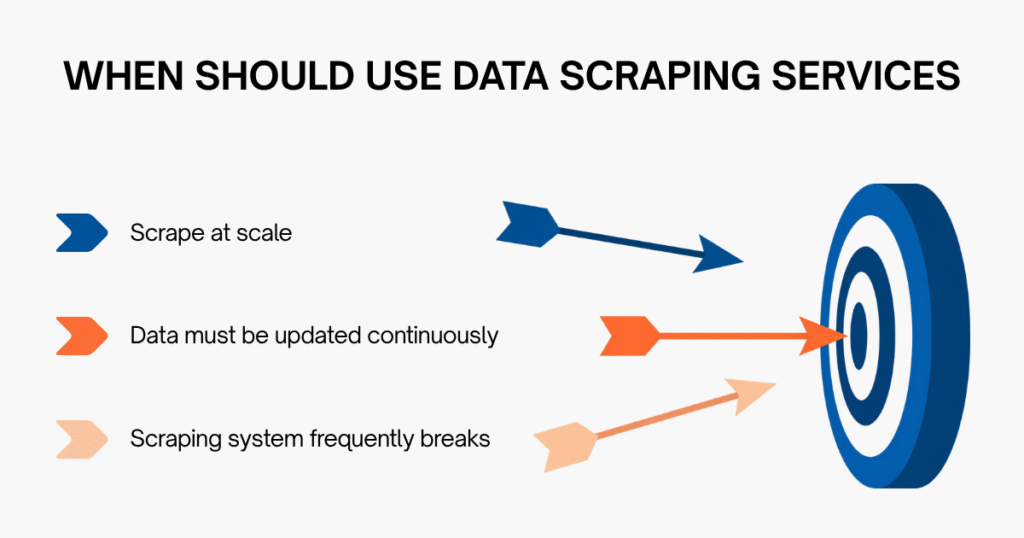
But when you start to scale, things change. Web scraping problems no longer happen “occasionally”, but start repeating continuously. At that point, the team spends more time fixing issues and keeping the system stable instead of actually using the data.
This is when you should consider a more professional solution.
Instead of building and fixing everything yourself, you can use e-commerce data scraping services from Easy Data, where the system is already designed to meet your needs:
- Collect data from both web and app
- Customize based on specific goals (product, price, keyword, search…)
- Support multiple Southeast Asia markets (Vietnam, Thailand, Indonesia…)
- Update data based on your schedule (hourly, daily…)
You no longer need to fix web scraping problems constantly. Instead, you get clean, standardized datasets ready for analysis and decision-making.
Final Thought
Web scraping in 2026 is no longer easy. Each web scraping problem is a potential “breaking point” in your system. But if you clearly understand where the problem happens, why it happens, and how to handle it correctly, you can absolutely build a stable and scalable scraping system.
And if you want to shorten implementation time and avoid constantly “putting out fires”, a more practical solution is to use a full-service data scraping provider.
Why does a scraper work at first but fail later?
Because websites can:
- Detect bot behavior over time
- Change their HTML structure
- Apply rate limiting
=> A scraper must be designed to handle change, not just work once.
How can you avoid getting blocked when web scraping?
Common approaches include:
- Reducing request speed
- Using proxies
- Simulating real browser behavior
- Avoiding login-protected data
=> The key is to avoid acting like a bot.
Why is scraped data often incorrect or incomplete?
Common causes:
- Incorrect selectors
- Dynamic content not rendered
- DOM structure changes
- No data validation step
=> That’s why data cleaning and validation are critical.
What is the hardest part of web scraping?
Not the code itself, but:
- Anti-bot systems
- Scaling infrastructure
- Maintaining data consistency
=> These are what make real-world scraping challenging.
Leave a Reply