

Free Shopee Thailand Dataset: 540 Historical Listings
Explore a public sample of diaper listings recorded on January 31, 2025. Use it to inspect data quality, prototype reports and define your next collection.
- 540 unique shop-and-item pairs from 151 shops
- Thailand; prices in Thai baht (THB)
- 23 fields for products, prices, sellers, ratings and source counters
- Historical snapshot; not current prices or a monthly transaction report
Source reviewed October 4, 2026. The review date is not a new collection date.

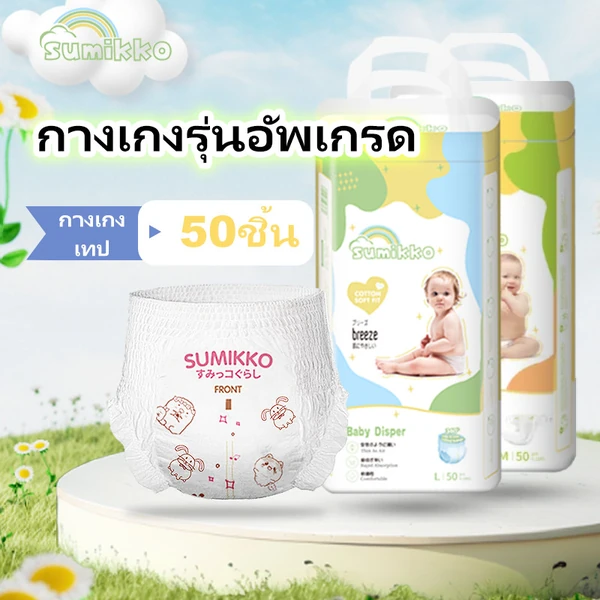 Sumikko 50 pcs Baby Diapers
 4.88
 50 pcs Thin & Soft Diapers
 Sumikko 50 pcs Soft Tape Diapers
Sample listings recorded January 31, 2025
Three records from the public Thailand worksheet. Prices are in THB. The product links identify the original listings; today’s pages may show different values.
Field guide for the free Shopee dataset
The free Shopee dataset uses the column names below, which match the CSV header exactly. The explanations describe how to handle the recorded values. A populated cell is not independent confirmation of a listing’s accuracy.
Product details
category- The recorded category label combines an identifier and a name. In this file it reads
11046127-Tape Pants Disposable Diapers. Preserve the full label when importing it. name- The recorded listing title. It may contain Thai text, product sizes and pack quantities. A title can describe several options, so it is not a reliable mapping from each variant to its price.
url- The original product-page link. Use it to identify the listing or review its current presentation. A current page may differ from the historical row, or may no longer be available.
imageUrl- The recorded image location. Open this URL for a visual reference to the listing. Remote images can change or become unavailable.
brand- The recorded brand label, with 50 blanks. A missing label means no value was recorded. It does not establish that the product has no brand or should be grouped with unrelated unbranded products.
Prices & discounts
price- The recorded listing-price value in THB. Check it alongside the minimum and maximum fields. It does not establish the delivered cost of a particular variant after shipping or buyer-specific offers.
price_before_discount- The recorded reference price used in the example above. There are 83 zero values. Flag these rows and leave the calculated discount blank when the reference price is zero.
discountPercent- The recorded percentage discount. Compare it with a calculation from the corresponding price and reference price where both are usable. Allow for whole-number rounding and investigate differences rather than overwriting them.
-
price_minandprice_max - The recorded lower and upper listing-price values. Different values flag listings that need a variant check. The file does not identify which size or pack corresponds to every price within the range.
-
price_min_before_discountandprice_max_before_discount - The corresponding recorded reference-price range. Keep both fields. Without a variant mapping, combining one end of this range with another price can produce a misleading discount.
Sellers & identifiers
shop_name- The recorded shop display name. Names can change and are less suitable than identifiers for joining snapshots. Use
shopIdfor the shop key and retain the name for readability. itemId- The item identifier, stored as text for joins and exports. Combine it with
shopIdto form the listing key used in this review. All 540 pairs are unique in the reviewed file. shopId- The shop identifier. The file contains 151 distinct values. Several listings can belong to one shop, so a shop count and a listing count describe different things.
flex_name- An optional source label with 338 blank cells. Its meaning is not defined in the worksheet. Keep it as recorded and obtain a source specification before using it as a business classification.
Ratings & counters
sold- A source sales counter recorded with the listing. Its measurement period is not defined in the worksheet. Do not label it January sales or monthly orders without a verified source definition.
historySold- A second source counter. The name suggests a historical count. The file does not define its period, reset behavior or relationship to
sold. Preserve the original name in analysis. rating_count- The recorded rating counter. Use it as source context rather than a count of verified transactions. The file does not show whether it covers the same activity as either sales counter.
rating- The recorded numerical rating. Preserve its source precision for calculations and round only for display. The three sample rows above are shown to two decimal places.
Dates & market
currency- The currency code is
THBin every reviewed row. Keep it beside price values when combining files from different markets. No currency conversion is included in this sample. updateTime- The recorded date is
31/1/2025throughout the file. The source does not supply a capture time or time zone. This value is not a guarantee that a listing was updated at a particular hour. country- The recorded market is
Thailandfor all 540 rows. This identifies the market covered by the file. It does not tell you where a seller is registered, where orders ship from or where products are made.
No field matches that search.
What the sample checks reveal
Across all 540 records, 233 have different minimum and maximum prices. This means 43.1% of the sampled listings need a variant check before their lowest price is used in an offer comparison.
Different price_min and price_max
These listings have different recorded minimum and maximum prices. Check the selected variant before comparing offers.
price_before_discount equals zero
These rows have no usable reference price — leave their calculated discount blank rather than dividing by zero.
Blank brand
No brand value was recorded for these rows. A blank is not evidence that a product is unbranded.
View all source checks
| Check | Records | Calculation |
|---|---|---|
Different price_min and price_max
|
233 | 233 ÷ 540 × 100 = 43.1% |
price_before_discount equals zero |
83 | 83 ÷ 540 × 100 = 15.4% |
Blank brand
|
50 | 50 ÷ 540 × 100 = 9.3% |
Blank flex_name
|
338 | 338 ÷ 540 × 100 = 62.6% |
Percentages use all 540 records and are rounded to one decimal place. These groups overlap; do not add their percentages. Keep blanks separate from zero and do not calculate a percentage discount when its reference price is zero.
A discount calculation you can reproduce
The Sumikko record for shop 1135271452, item 24715056594, has a price of 122 THB and a reference price of 248 THB. Its calculated discount is (248 − 122) ÷ 248 × 100 = 50.8%, which rounds to the recorded whole-number discount of 51%.
This record’s variant price range is 122–176 THB. Its title mentions 50 pieces and several sizes, but the worksheet does not map pack quantities to individual variant prices. Confirm the selected variant and quantity before calculating a per-diaper price; shipping and buyer-specific vouchers may also change the checkout total.
(248 − 122) ÷ 248 × 100
= 50.8%
Rounds to the recorded 51%
Fields and method
The 23 source fields cover listing and shop identity, product descriptions and URLs, prices and discounts, date and market, ratings, source sales counters and optional labels. Use shopId with itemId as the listing key. Retain identifiers as text. All 540 pairs are unique in this worksheet.
price, price_min and price_max are recorded listing-price fields. rating_count and rating describe recorded ratings. sold and historySold are source counters whose reporting windows are not documented here. A blank brand means no value was recorded; the meaning of flex_name requires a source specification.
We reviewed the public Shopee worksheet linked from the Easy Data sample page. We counted every populated row after the header, checked country, currency and date, counted unique IDs, compared minimum and maximum prices numerically, and counted zero reference prices and blank labels. No records were excluded. All dates read 31/1/2025; the source does not give a collection time or timezone.
What this snapshot cannot establish
The source does not document its original selection rules, failed-page counts or complete category coverage. These observations cannot establish current prices, monthly sales, category-wide market share or a trend. Displayed counters are not audited transactions, and multiplying a price by a counter does not produce verified revenue.
For comparisons across dates, see the three-month Thailand diaper dataset guide. Match markets, dates, shop/item pairs, variants and pack sizes before interpreting differences.
Need a different market, category or refresh schedule? Review the Shopee data service and request a scoped sample and quote.
How to open and use the free Shopee dataset
-
Keep an original copy. Open the public worksheet or download the CSV using the links above. Save the original before filtering, translating product names or changing column types. Record the download date separately from the January 31, 2025 snapshot date.
-
Import the columns deliberately. Use UTF-8 encoding so Thai product names remain readable. Keep
itemIdandshopIdas text identifiers. Read31/1/2025as January 31, 2025 rather than relying on a spreadsheet’s automatic date interpretation. -
Check the shape of the file. The reviewed copy contains 540 data rows and 23 columns, plus its header. Check the unique shop-and-item pairs before joining another table. A join using the shop ID alone can repeat rows when a shop has several listings.
-
Choose a question the fields can answer. Start with a listing inventory, missing-value report or variant-price check. For a price comparison, match the product, size and pack quantity first. Keep a note of the rows you exclude and the reason for each exclusion.
Who Should Use This Dataset?
Why Choose Easy Data?
Questions about the free Shopee dataset
Do I need a form to access the free Shopee dataset?
You can inspect the public worksheet and download its CSV directly from the links above. Use the enquiry form if you would like help interpreting the fields or want a dataset tailored to your requirements.
Can I use the free Shopee dataset to test a dashboard?
Yes. The file is useful for testing imports, identifier handling, missing-value checks and listing-level reports. Label demonstrations with the snapshot date and market. Results describe this historical sample; they do not measure today’s complete diaper market.
Can Easy Data tailor a collection to my needs?
Yes. Tell us what you want to achieve, whether you have a detailed specification or an initial idea. We can tailor the target platforms, markets, fields, collection schedule and delivery format around your requirements. Contact Easy Data to discuss your project.
Request a Shopee Dataset
For another market, category, field selection or collection schedule, tell us what you need below. The free sample on this page stays downloadable without completing any form — or review the Shopee data service first.