


Introduction: Basics of Web Scraping
The basics of web scraping involve extracting data from websites using automated scripts. This technique helps businesses, researchers, and developers gather structured information from the internet efficiently.
Web scraping can support market research, competitor analysis, price tracking, and SEO monitoring. This beginner guide separates fetching a page from parsing its HTML, gives you a runnable local exercise, and shows how to detect missing fields. A collection is an observation at a particular time; it does not guarantee real-time or complete coverage.
- Introduction: Basics of Web Scraping
- What is Web Scraping?
- Why Learn the Basics of Web Scraping?
- Essential Tools for Web Scraping
- How to Get Started with Web Scraping?
- Challenges in Web Scraping & How to Overcome Them
- Legal Considerations in Web Scraping
- Final Thoughts: The Importance of Learning the Basics of Web Scraping
What is Web Scraping?
Web scraping is the process of automatically collecting data from web pages. Instead of manually copying and pasting content, web scraping tools extract and store information in CSV, JSON, or databases for further analysis.
How Web Scraping Works
- Send an HTTP Request – Fetch a permitted page and check the response status and content type before parsing it.
- Parse the HTML Code – Locate the required elements, extract their text or attributes, and detect absent or empty fields.
- Store the Data – Keep validated records, the source and observation time, and a separate count of rejected records. A successful HTTP response alone does not prove that extraction worked.
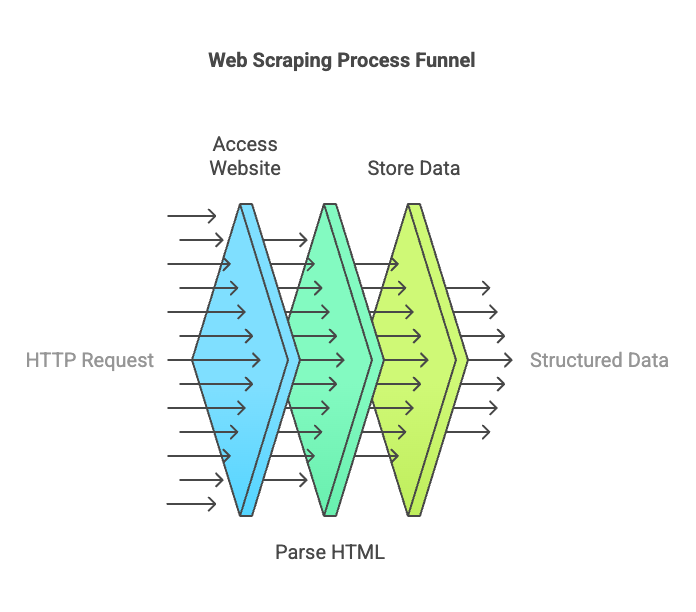
A parser processes the HTML you supply. It does not automatically run JavaScript, follow pagination or identify the correct product variant. The e-commerce collection workflow explains how to define fields and validate comparable offers before using the results.
Why Learn the Basics of Web Scraping?
Understanding the basics of web scraping is essential for:
✔ Automating repeatable collection while checking what was missed
✔ Tracking competitor offers with consistent variants, locations and timestamps
✔ Reviewing page metadata for your SEO audit
✔ Researching businesses without treating public personal information as unrestricted marketing data
✔ Comparing dated market observations without mistaking a small sample for the whole market
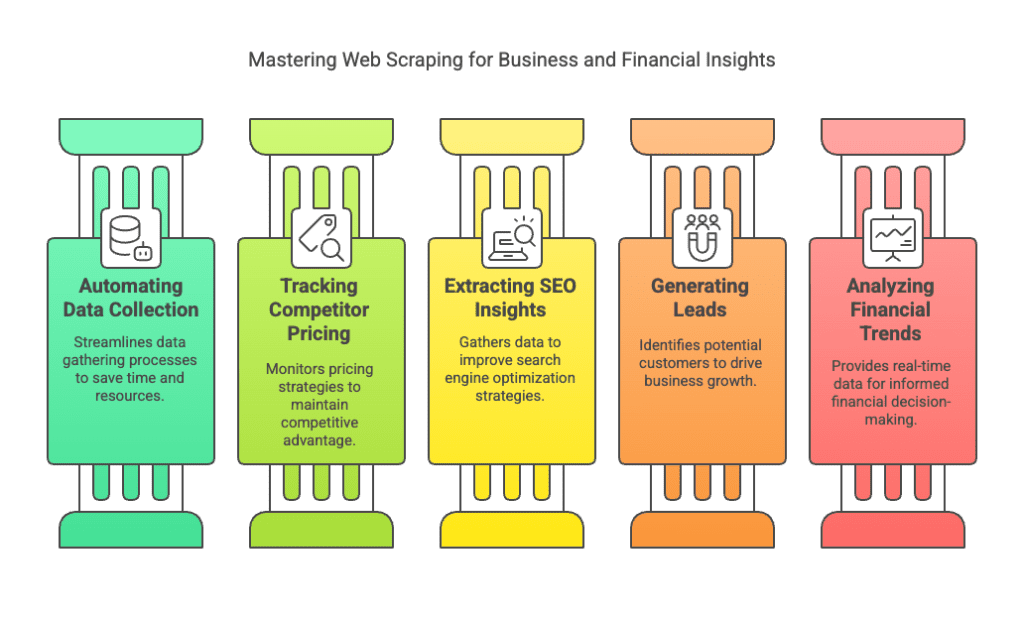
These applications show why the basics of web scraping are valuable in today’s data-driven economy.
Essential Tools for Web Scraping
1. Web Scraping Libraries
| Tool | Role | Language examples |
|---|---|---|
| Scrapy | Crawling and structured extraction framework | Python |
| Beautiful Soup | Parse supplied HTML; no browser or HTTP fetching built in | Python |
| Selenium | Automate a browser when interaction is needed | Python, JavaScript, others |
| Puppeteer | Automate Chrome or Firefox | JavaScript |
| Playwright | Browser automation across supported engines | JavaScript/TypeScript, Python, Java, .NET |
For a broader tool comparison, see our web scraping framework and tool selection guide. It distinguishes crawlers, parsers, browser automation and hosted services, with a small acceptance exercise for checking extraction quality.
2. HTML & CSS Selectors
Web scrapers use HTML elements like <div>, <p>, and <table> to extract data.
📌 Local HTML example: This invented price fragment is part of the exercise, not a live store observation. The dollar sign alone does not identify its currency.
<div class="price">$299.99</div>
Using Beautiful Soup in Python, select the price element, check that it exists, and extract its text. See the parser documentation for selectors and text extraction.
from bs4 import BeautifulSoup

html = '<div class="price">$299.99</div>'
soup = BeautifulSoup(html, "html.parser")
node = soup.select_one(".price")
if node is None:
    raise ValueError("Price element is missing")
price = node.get_text(" ", strip=True)
if not price:
    raise ValueError("Price is empty")
print(price)  # $299.99
How to Get Started with Web Scraping?
Step 1: Install Web Scraping Libraries
Use Python 3 in a virtual environment. Run the command below with the same interpreter you will use for the script; on some systems the command is python3. The local exercise uses Beautiful Soup, while Requests is for the later fetching step.
python -m pip install requests beautifulsoup4
Step 2: Write a Simple Web Scraper
import json
from bs4 import BeautifulSoup

# Fictional local input; this makes no network requests.
html = """
<div class="product">
  <h2>Tea cup</h2><span class="price">USD 12.50</span>
</div>
<div class="product">
  <h2>Coffee mug</h2><span class="price">USD 15.00</span>
</div>
<div class="product"><h2>Incomplete item</h2></div>
"""
soup = BeautifulSoup(html, "html.parser")
cards = soup.select(".product")
if not cards:
    raise ValueError("No product cards: check input and selector")

records, rejected = [], []
for position, card in enumerate(cards, start=1):
    fields = dict()
    for key, selector in [("name", "h2"), ("price_raw", ".price")]:
        node = card.select_one(selector)
        fields[key] = node.get_text(" ", strip=True) if node else ""
    if not all(fields.values()):
        rejected.append(position)
        continue
    records.append(fields)

print(json.dumps(records, indent=2, ensure_ascii=False))
print(f"Cards: {len(cards)}; saved: {len(records)}; "
      f"rejected: {len(rejected)}")
print(f"Rejected card positions: {rejected}")
Run and check: Save the example as scrape_demo.py and run python scrape_demo.py. It prints two JSON records and Cards: 3; saved: 2; rejected: 1, followed by rejected position [3]. The missing price is not converted to zero. The example deliberately prints the data; redirect its output to a file only if you also separate the diagnostic lines from the JSON.
Try a failure case: Remove all product cards and confirm that the script reports no matches. Remove a price, or replace a name with whitespace, and confirm that the rejected count increases. When you collect real offers, retain the raw price and explicitly normalize the currency, decimal format, variant and shipping scope before comparing values.
Move to a permitted live source: First choose a source whose access and reuse conditions fit your project. With Requests, set a timeout on the GET request, call response.raise_for_status(), and confirm that the response is the expected HTML before passing it to Beautiful Soup. Requests does not execute page JavaScript. A timeout limits connection/read waiting rather than guaranteeing a total run duration. Stop to investigate access denials, rate limits, challenge pages or unexpected redirects; do not parse them as products. For a documented API example, our YouTube comments tutorial demonstrates a bounded page loop and explains the difference between top-level comments and replies.
Define a small acceptance check: Compare each extracted name and price with its source, record the page URL and UTC observation time, and account for matched and rejected cards. Agree the required fields and refresh interval before adding pagination or scheduling. IANA reserves example.com for documentation; it is not a working product catalog for this tutorial.
Challenges in Web Scraping & How to Overcome Them
| Challenge | Response |
|---|---|
| JavaScript-rendered content | Check for a documented API or export. If browser collection is permitted, wait for the required elements before extracting them. |
| CAPTCHA or access denial | Pause collection and review access conditions or contact the provider. A different tool does not establish permission. |
| Changed page structure | Test selectors against saved samples and monitor missing-field and zero-match counts. |
| Rate limits or transient errors | Reduce request frequency and follow provider retry guidance. Keep bounded retries separate from extraction failures. |
📖 Further reading: The coverage and price example shows why missing observations should be reported alongside the collected results.
Legal Considerations in Web Scraping
Before collecting from a real source, review its access terms, the intended reuse and any applicable privacy or copyright requirements. The following checks do not establish legal permission for every project:
✔ Robots.txt – Respect crawler rules. RFC 9309 explicitly distinguishes these rules from access authorization.
✔ Personal information – Public availability does not remove privacy obligations. Minimize collection and assess the purpose, retention and permitted use.
✔ API or licensed export – Prefer a documented source when it supplies the required fields under suitable terms; availability and limits vary by provider.
Do not bypass a login, paywall or other access restriction. Review copyright, contractual and privacy questions for the specific source and jurisdiction before collecting or redistributing its contents.
📖 Privacy reference: The joint statement from data protection authorities explains why publicly accessible personal information remains subject to privacy laws in most jurisdictions.
Final Thoughts: The Importance of Learning the Basics of Web Scraping
Learning the basics of web scraping starts with a small, checkable extraction. Run the local example, test missing fields, then choose a permitted source and verify a sample before scaling. A useful result includes its source, observation time and coverage limitations, not just a list of values.
📩 Need web scraping solutions? Contact Easy Data for expert data extraction services.
Leave a Reply