

E-commerce has transformed how businesses operate, and platforms like Shopee offer valuable data for competitive analysis, pricing strategies, and customer sentiment. Crawling this data can reveal trends, pricing fluctuations, product popularity, and more. This guide covers the essentials of crawling Shopee data, including ethical considerations, technical steps, and advanced methods to manage and utilize the data effectively.
- 1. Introduction to Web Scraping and Data Crawling
- 2. Why Crawl Shopee Data? Business Use Cases
- 3. Ethical and Legal Considerations in Crawling Shopee
- 4. Setting Up the Environment and Tools
- 5. Step-by-Step Guide to Crawl Shopee Data
- 6. Advanced Techniques and Optimizations
- 7. Handling Legal and Technical Challenges
- 8. Best Practices for Data Management
- 9. Leveraging the Data: Analysis and Visualization
- 10. Conclusion: Responsible Crawling and Future Directions
1. Introduction to Web Scraping and Data Crawling
Understanding Web Scraping
Web scraping is an automated method of collecting data from websites. For businesses, it enables the gathering of data that is not readily available through official channels, like Shopee’s public APIs, and provides real-time insights into pricing, product availability, and customer preferences.
Data Crawling Defined
Data crawling is a systematic way of navigating a website to collect data across multiple pages. In the context of Shopee, a crawler can visit different categories, product pages, and even customer review sections to gather a variety of information.
Key Tools for Web Scraping
To crawl and scrape Shopee data effectively, you’ll likely use a mix of tools and frameworks, each offering unique advantages depending on the nature of your data and the complexity of Shopee’s website. Common tools include:
-
Python Libraries:
- BeautifulSoup: For parsing HTML, ideal for simpler scraping tasks.
- Scrapy: A powerful framework for large-scale, structured data extraction.
- Selenium: For handling dynamic content or pages that require user interaction.
-
JavaScript Libraries:
- Puppeteer: Often used for scraping JavaScript-heavy sites where the content is rendered dynamically.
- Proxies and IP Rotation Services: Tools like ProxyMesh or Bright Data prevent IP blocks by rotating IP addresses, which is essential for high-volume scraping.
By using these tools responsibly, you can access vast amounts of data without violating site policies or legal guidelines.
2. Why Crawl Shopee Data? Business Use Cases
Crawling Shopee data provides actionable insights for a variety of business applications:
Market Research and Trend Analysis
Shopee lists millions of products across categories, offering a rich dataset for analyzing market trends. For example, tracking items in popular categories like electronics or fashion can reveal seasonal demands, price trends, and emerging products.
Competitor Monitoring
Keeping tabs on competitor product listings, prices, and promotional strategies allows businesses to refine their own pricing models. By observing competitors’ promotional patterns or seasonal discounts, a business can adjust its listings to stay competitive.
Dynamic Pricing and Price Optimization
E-commerce pricing is highly competitive and fluctuates frequently. Monitoring Shopee prices lets retailers adjust their prices in real-time to maintain profitability and competitiveness.
Customer Sentiment Analysis
Customer reviews are a goldmine of insights. By analyzing Shopee’s review sections, businesses can understand customer sentiments, identify recurring complaints, and refine their products based on user feedback.
3. Ethical and Legal Considerations in Crawling Shopee
When crawling Shopee data, it’s essential to operate within legal and ethical boundaries to avoid penalties and protect consumer privacy.
Adhere to Shopee’s robots.txt File
Shopee’s robots.txt file provides guidelines for web crawlers, indicating which sections of the site are off-limits. To view the file, go to https://shopee.com/robots.txt. Avoid accessing restricted areas, as this may violate Shopee’s terms of service.
Rate Limiting and Respecting Server Load
Excessive requests can overload Shopee’s servers, affecting site performance for other users. Implement rate limiting by adding time intervals between requests. This lowers the risk of detection and reduces server load.
Comply with Data Protection Regulations
Avoid collecting personal data, such as customer contact information, without permission. Regulations like the GDPR (General Data Protection Regulation) in the EU and CCPA (California Consumer Privacy Act) in the US govern data collection practices. Staying compliant is crucial to avoid legal repercussions.
4. Setting Up the Environment and Tools
Select the Right Tool for Your Project
Choosing the right tool depends on your project’s scope and complexity:
- BeautifulSoup and Requests for small, simple projects.
- Scrapy for complex, large-scale crawling.
- Selenium for dynamic sites where pages load additional content on interaction.
Proxy and User-Agent Configuration
To prevent getting blocked, configure your scraper to use proxies and rotate user-agent strings. User-agent rotation makes it appear that the requests are coming from different browsers or devices, reducing the chance of detection.
Setting Up Python Libraries
Here’s how to set up essential libraries:
Copied!# Install BeautifulSoup, Requests, and Selenium !pip install beautifulsoup4 requests selenium pandas
Install a WebDriver for Selenium
If using Selenium, you’ll need to install a WebDriver (e.g., ChromeDriver for Google Chrome). After installation, ensure the WebDriver is in your PATH or provide the path in your script.
5. Step-by-Step Guide to Crawl Shopee Data
Let’s create a basic crawler to collect product information, including titles, prices, and ratings.
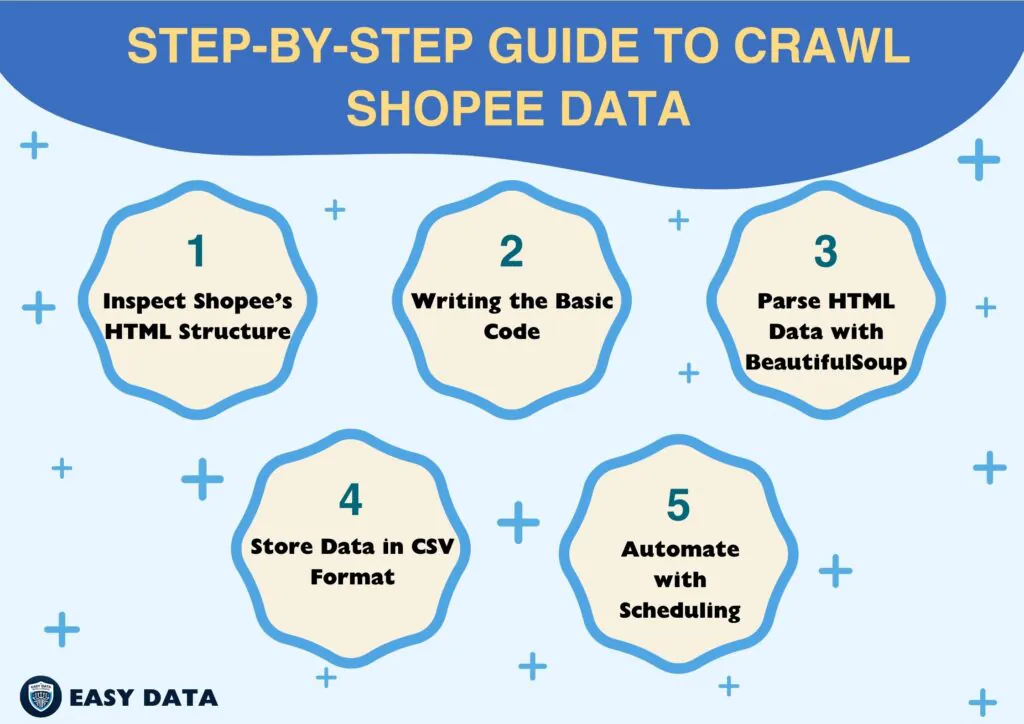
Step 1: Inspect Shopee’s HTML Structure
Before coding, inspect the HTML structure to identify the tags and classes containing the data you need. Right-click on a Shopee page, select Inspect, and locate elements for product titles, prices, and ratings.
Step 2: Writing the Basic Code
Using BeautifulSoup and Requests, we can create an initial script to request Shopee data.
Copied!import requests from bs4 import BeautifulSoup url = "https://shopee.com/category" headers = {"User-Agent": "Mozilla/5.0"} response = requests.get(url, headers=headers) if response.status_code == 200: print("Successfully accessed Shopee!") else: print("Failed to access Shopee")
Step 3: Parse HTML Data with BeautifulSoup
Using BeautifulSoup, extract the relevant elements from Shopee’s HTML.
Copied!soup = BeautifulSoup(response.text, 'html.parser') # Example: Extracting product titles titles = soup.find_all("div", class_="product-title-class") # Replace with actual class for title in titles: print(title.text.strip())
Step 4: Store Data in CSV Format
Store the data in a structured format for easier analysis.
Copied!import pandas as pd data = {"Title": [], "Price": []} # Define the data structure # Extract title and price for each product (replace with actual HTML tags) for product in products: data['Title'].append(product.find('title-class').text.strip()) data['Price'].append(product.find('price-class').text.strip()) df = pd.DataFrame(data) df.to_csv('shopee_data.csv', index=False)
Step 5: Automate with Scheduling
Automate the scraping process by setting up a cron job (Linux) or Task Scheduler (Windows) to execute your script at regular intervals.
6. Advanced Techniques and Optimizations
Handle Infinite Scrolling with Selenium
Shopee often uses infinite scrolling, which dynamically loads more products as you scroll. Selenium can automate this scrolling.
Copied!from selenium import webdriver import time driver = webdriver.Chrome() driver.get("https://shopee.com/category") last_height = driver.execute_script("return document.body.scrollHeight") while True: driver.execute_script("window.scrollTo(0, document.body.scrollHeight);") time.sleep(2) new_height = driver.execute_script("return document.body.scrollHeight") if new_height == last_height: break last_height = new_height
Proxy Rotation for Large-Scale Crawling
To avoid IP blocks on large-scale projects, use rotating proxies. Services like ProxyMesh or Bright Data provide rotating proxies that distribute requests across various IP addresses.
CAPTCHA Solutions
If CAPTCHA barriers are common, consider CAPTCHA-solving services such as 2Captcha. Integrate these services to handle CAPTCHA challenges programmatically.
7. Handling Legal and Technical Challenges
IP Ban Avoidance
Maintain a low request rate and rotate user-agents to avoid IP bans. Implement error-handling code to pause and retry in case of a block.
Understanding Shopee’s Policies
Review Shopee’s terms to ensure you comply with their scraping policies. In cases where you only need specific data, reach out to Shopee directly, as they may offer API access for approved use.
Data Protection and Compliance
Store data securely and anonymize it when possible. Encrypt sensitive data and adopt privacy protocols to comply with local and international regulations.
8. Best Practices for Data Management
Data Cleaning and Consistency
Remove duplicate entries, fill in missing data, and format values consistently. This enhances data quality and makes analysis smoother.
Database Storage
For large datasets, use a database such as MySQL or MongoDB. Databases support quick access, complex queries, and are ideal for handling big data.
9. Leveraging the Data: Analysis and Visualization
Visualization Tools
Data visualization tools like Tableau, Power BI, and Google Data Studio can transform raw data into visual insights. Create charts to identify trends, price distributions, and customer sentiment analysis.
Advanced Analysis Techniques
With Python libraries like Pandas and Matplotlib, perform advanced analysis to extract insights on customer preferences, seasonality in demand, and competitor behavior.
10. Conclusion: Responsible Crawling and Future Directions
Crawling Shopee data can provide profound insights into market trends, pricing strategies, and consumer behavior. By following this guide, you’re equipped to gather and manage data responsibly, yielding valuable intelligence for business decisions. Remember, responsible scraping—respecting Shopee’s policies and protecting user privacy—is essential for ethical data practices.
For further expansion, explore Shopee’s APIs if available, or consider advanced automation and real-time analysis tools as your crawling needs evolve.
Ready to start scraping Shopee data? Visit easydata.io.vn to learn more about our data scraping solutions and book a demo today!
Leave a Reply