

By 2025, scraping Shopee data is going to be essential. If you’re selling on Shopee in Southeast Asia, you’ll know prices can change in minutes, competitors run flash sales, and a bestseller today may not hold its position tomorrow… The question is whether you can spot those changes in time.
The team that gets data first has the advantage. That’s why many businesses use Shopee web scraping to monitor the market and competitors early, before investing in more advanced data systems.
So, where should you start to be both effective and safe in 2025?
Shopee web scraping in 2025 is the fastest way to track prices, competitors, and market trends in Southeast Asia. To do it effectively, you need to:
- Use a headless browser to handle JavaScript rendering
- Extract data from product pages (not just search pages)
- Apply proxy rotation and request delays to avoid blocking
- Clean and validate data before using it
- Store data in a structured format for analysis
For most teams, starting with a simple scraper is enough.
As you scale, the challenge is not collecting data, but keeping it stable, accurate, and continuously updated.
What is Shopee Web Scraping?
Shopee web scraping is the process of automatically collecting publicly available data directly from Shopee’s web interface, such as product name, selling price, shop information, ratings & reviews, and number of units sold.
Shopee has both a web platform and a mobile app, and the techniques for scraping data from each differ.
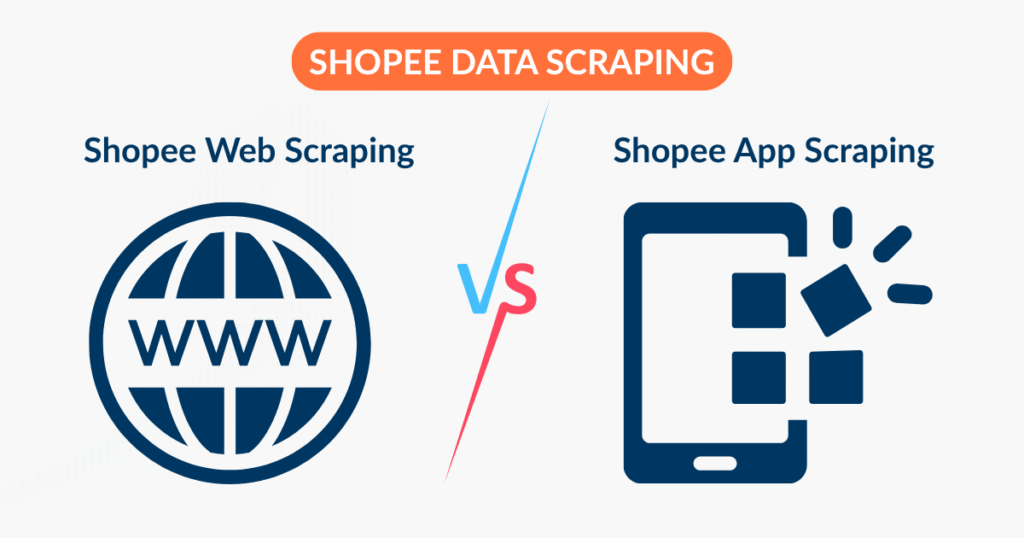
- Shopee web scraping → works with data displayed in the browser
- Shopee app scraping → typically involves reverse APIs or app traffic
Many teams overlook this, leading them to choose the wrong scraping method from the start, run into unnecessary technical errors without knowing the cause, and ultimately have to start over from scratch.
How to Do Shopee Web Scraping (Step-by-Step Guide for Beginners)
If you’ve ever searched “how to scrape Shopee data”, you’ll find plenty of technical tutorials. The problem is: most of them miss the real-world context.
Shopee is not a website where you can just “view source and get data”. It’s a SPA (Single Page Application), which means:
- Data is not available in the initial HTML
- Content is rendered via JavaScript
- Basic Shopee web scraping methods usually don’t work
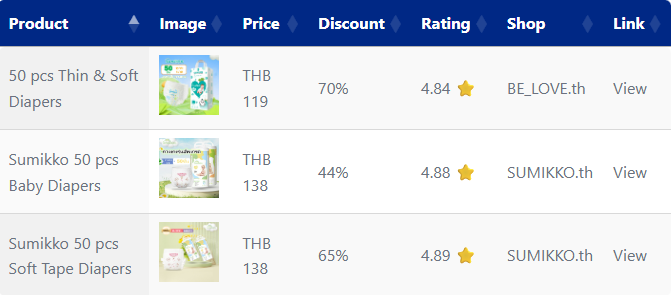
Therefore, in this guide, Easy Data will walk you through a specific case so you can follow along immediately: scraping “diapers” products from Shopee Thailand (web).
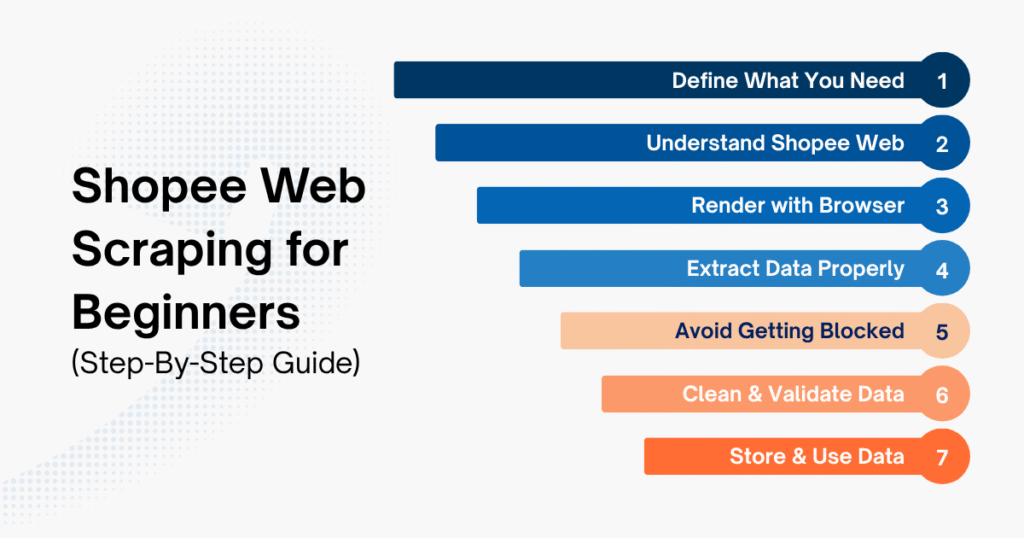
Step 1 – Define your source and required data
Before writing any code, answer two simple questions:
- Where are you getting the data from?
- What data do you actually need?
For example, if you want to test with diaper products on Shopee Thailand, you can define:
- Keyword
- Number of products
- Fields: name, price, rating, shop
Copied!KEYWORD = "diaper" LIMIT = 5 FIELDS = ["name", "price", "rating", "shop", "link"] OUTPUT_FILE = "shopee_diaper_th.csv"
Note: Don’t try to scrape everything. Focus on the data you will actually use.
Step 2 – Understand how the Shopee website displays data
One key thing: Shopee does not return data directly in HTML.
If you open DevTools and view page source, you’ll see almost no product data. That’s because Shopee renders everything using JavaScript after the page loads. Which means:
-
requests + BeautifulSoupalone → usually not enough - You need to simulate a browser
This is where many beginners get stuck with Shopee web scraping. For this case, a better approach is:
A more practical approach:
- Search page: used to retrieve product links
- Product detail page: scrape name, price, rating, and shop from structured data
Copied!BASE_URL = "https://shopee.co.th" SEARCH_URL = f"{BASE_URL}/search?keyword={quote(KEYWORD)}" print(SEARCH_URL)
Step 3 – Render the page using a headless browser
To handle JavaScript, tools like Selenium or Playwright are commonly used.
Copied!def build_driver(): options = Options() options.add_argument("--headless=new") options.add_argument("--window-size=1920,1080") options.add_argument("--lang=th-TH") options.add_argument( "--user-agent=Mozilla/5.0 (Windows NT 10.0; Win64; x64) " "AppleWebKit/537.36 (KHTML, like Gecko) Chrome/124.0.0.0 Safari/537.36" ) driver = webdriver.Chrome( service=Service(ChromeDriverManager().install()), options=options, ) return driver def open_search_page(driver, url): driver.get(url) WebDriverWait(driver, 30).until( EC.presence_of_all_elements_located( (By.CSS_SELECTOR, 'a[href*="-i."], a[href*="/product/"]') ) ) time.sleep(3) html = driver.page_source return html
After this step, you’ll finally have HTML containing the data. If you skip this step, nearly all of your Shopee web scraping will fail to work properly.
Step 4 – Scrape data from HTML
Once you have the rendered HTML, the next step is to parse the data. Instead of relying on classes like .title ,.price ,.rating ,.shop-name on the search page, a better approach is:
- Retrieve the product link from the search page
- Open each product page
- Extract the name, price, rating, shop, and link from the
JSON-LDdata
Copied!def extract_product_links_from_search_html(html, base_url=BASE_URL, limit=5): soup = BeautifulSoup(html, "html.parser") links = [] seen = set() for a in soup.select('a[href*="-i."], a[href*="/product/"]'): href = a.get("href") if not href: continue href = urljoin(base_url, href.split("?")[0]) if not href.startswith(base_url): continue if href in seen: continue seen.add(href) links.append(href) if len(links) >= limit: break return links def extract_product_detail_from_html(html, fallback_url): soup = BeautifulSoup(html, "html.parser") for script in soup.select('script[type="application/ld+json"]'): raw = script.string or script.get_text(strip=True) if not raw: continue try: data = json.loads(raw) except json.JSONDecodeError: continue items = data if isinstance(data, list) else [data] for obj in items: if not isinstance(obj, dict): continue if obj.get("@type") != "Product": continue offers = obj.get("offers") or Array if isinstance(offers, list): offers = offers[0] if offers else Array aggregate = obj.get("aggregateRating") or Array seller = offers.get("seller") or Array brand = obj.get("brand") or Array return { "name": obj.get("name"), "price": offers.get("price"), "rating": aggregate.get("ratingValue"), "shop": seller.get("name") or brand.get("name"), "link": offers.get("url") or fallback_url, } return { "name": None, "price": None, "rating": None, "shop": None, "link": fallback_url, } def extract_products_from_search(driver, limit=5): search_html = driver.page_source product_links = extract_product_links_from_search_html(search_html, limit=limit) products = [] for link in product_links: driver.get(link) WebDriverWait(driver, 20).until( EC.presence_of_element_located( (By.CSS_SELECTOR, 'script[type="application/ld+json"]') ) ) time.sleep(2) product = extract_product_detail_from_html(driver.page_source, driver.current_url) if product["name"]: products.append(product) return products
At this stage, understanding the Shopee website structure matters more than the code itself
Step 5 – Avoid getting blocked (Proxy & Request Strategy)
Shopee website has a fairly clear anti-bot mechanism:
- Too many requests too quickly → blocked
- Using the same IP continuously → blocked
Basic handling:
Copied!def human_sleep(min_seconds=2, max_seconds=5): time.sleep(random.uniform(min_seconds, max_seconds)) def safe_get(driver, url, retries=3): last_error = None for _ in range(retries): try: human_sleep() driver.get(url) return except Exception as e: last_error = e time.sleep(5) raise last_error
When running in production, you’ll need to add:
- Delay between requests
- Rotate IPs per session
- Retry on failure
Without this, your Shopee web scraping setup might stop working after just a few minutes. If you want to apply this to Step 4 right away, simply replace this line: driver.get(link) with safe_get(driver, link) .
Step 6 – Clean and validate data
Data scraped from the web is rarely “clean” from the start; your data may encounter issues such as prices with currency symbols, commas, or missing values; inconsistent formatting, duplicate data, etc. A simple validation example:
Copied!def clean_products(products): cleaned = [] for p in products: try: price = float(p["price"]) if p["price"] not in (None, "") else None except ValueError: price = None try: rating = float(p["rating"]) if p["rating"] not in (None, "") else None except ValueError: rating = None row = { "name": p["name"].strip() if p["name"] else None, "price": price, "rating": rating, "shop": p["shop"].strip() if p["shop"] else None, "link": p["link"], } if row["name"] and row["price"] is not None: cleaned.append(row) seen = set() unique_rows = [] for row in cleaned: if row["link"] in seen: continue seen.add(row["link"]) unique_rows.append(row) return unique_rows
Step 7 – Store and use the data
This is the step that many teams struggle with the most. Shopee web scraping without knowing how to use data is almost pointless. Depending on your goals, you can:
- Store it in a database
- Build a price tracking dashboard
- Set alerts when competitors make changes
Example of running an end-to-end Shopee web scraping process and saving to CSV:
Copied!driver = build_driver() try: open_search_page(driver, SEARCH_URL) raw_products = extract_products_from_search(driver, limit=LIMIT) final_products = clean_products(raw_products) df = pd.DataFrame(final_products, columns=FIELDS) print(df.to_string(index=False)) df.to_csv(OUTPUT_FILE, index=False, encoding="utf-8-sig") print(f"\nSaved to {OUTPUT_FILE}") finally: driver.quit()
Easy Data Playbook: Production-Level Fixes for Unstable Shopee Web Scraping
If you’ve followed the steps above but are still getting inconsistent results, the issue usually lies in the smallest details. The following tips will help make your Shopee web scraping process significantly more stable:
-
Don’t parse HTML immediately after
driver.get(): Shopee loads data via JavaScript, so if you retrieve the page source too early, you’re likely to scrape a page that hasn’t fully loaded yet. - Don’t rely solely on class names on the search page: CSS classes on Shopee may change over time. For beginners, a safer approach is to retrieve the link from the search page and then extract the main data from the product detail page.
- Always normalize links before saving: Remove unnecessary query strings from the URL to prevent a single product from being saved multiple times.
- Add random delays between page requests: If requests are too frequent and too fast, the risk of being blocked increases. Random delays are generally better than fixed sleep intervals.
- Always include a retry mechanism if a page fails to load: Sometimes the page loads, but the product data hasn’t rendered yet. Without a retry, you’ll lose data without realizing it.
- Validate immediately after scraping: If a name exists but the price is empty, or the rating is in the wrong format, you should exclude or flag that record before saving it.
- Manually check the first few lines: Don’t assume the scraper is working just because the code runs. Open the first 5–10 products to verify the name, price, rating, and shop.
- Save raw HTML or raw JSON samples when debugging: When the scraper fails, the raw sample will help you quickly determine whether the issue is due to the code or because Shopee changed the structure.
- Log each step clearly: For example, opened the search page, found how many links, extracted how many valid products. Just by looking at the log, you’ll know exactly where the Shopee web scraping process is stuck.
Best Tools for Shopee Web Scraping
Not every team wants (or is able) to build a scraping system from scratch. In fact, when starting with Shopee web scraping, many businesses opt to use tools to quickly test a use case, collect data on a small scale, or support non-technical teams.
| Tool Category | Popular Examples | What It Helps With | How It Works | Best Stage | Best For | Notes |
| No-code scraping tools | Octoparse, ParseHub | Extract product, price, rating data from Shopee web | Select elements directly on the interface | Getting started / quick testing | Marketers, non-technical users | Can get blocked easily if crawling at scale |
| Browser extensions | Web Scraper (Chrome) | Scrape simple data from web pages | Runs directly in the browser | Quick testing | Non-coders | Not stable, hard to use long-term |
| Cloud scraping platforms | Apify | Automate scraping and schedule jobs | Runs on cloud, scalable | Intermediate | Startups, small data teams | Requires basic understanding of scraping logic |
| Developer frameworks | Scrapy, Playwright, Selenium | Build custom scraping systems | Code-based (Python / JS) | Long-term scaling | Developer teams | Time-consuming to build and maintain |
| Proxy & infrastructure providers | Bright Data, Zyte | Provide IP rotation, avoid blocking | Works alongside scraper | Large-scale | High-volume teams | Cost increases with usage |
| Managed data services | Shopee-focused data providers (Easy Data) | Provide ready-to-use scraped and processed data | No scraping required | Fast scaling | Business teams | Limited control over raw data |
Important Note:
No tool can guarantee a smooth, one-time Shopee web scraping process. Whether you use a no-code tool, an extension, or build your own system, sooner or later you’ll run into these issues:
- Shopee changes its UI → selectors break
- Crawl a bit too fast → get IP blocked
- Data retrieved → missing or incorrect
This is the nature of Shopee web scraping on a constantly evolving platform. And to overcome these challenges, there’s no better solution than learning how the Shopee website actually works.
Legal & Ethical Considerations for Shopee Web Scraping
It’s not too hard to get started with Shopee web scraping, so many teams focus solely on obtaining data without considering legal issues and proper collection methods from the outset. This makes the data unusable, the system doesn’t run smoothly, and they have to start over.
When can Shopee web scraping be considered a violation?
- Scraping non-public data (data requiring a login, internal data, or information not publicly displayed on the website,…)
- Aggressive scraping: Sending requests in rapid succession without delays, which impacts Shopee’s system. This can easily lead to being blocked; in severe cases, it may be considered abuse
- Violating the Terms of Service: You don’t need to read them in depth, but if you’re conducting large-scale Shopee web scraping without understanding the rules, you’re likely to go off track
- Scraping or processing personal data (PDPA/GDPR), such as user information, sensitive data, etc.
- Using data for unclear or uncontrolled purposes: Sharing data indiscriminately, using it for commercial purposes without controlling the source.
How to Safely Perform Shopee Web Scraping?
Based on the experience implementing numerous successful projects in Southeast Asia, this is Easy Data’s approach to ensuring a “low-risk, long-term” Shopee web scraping system:
- Only scrape publicly available data from the web: Prices, products, ratings, and shop information, … Avoid areas requiring login.
- Crawl at a reasonable speed: Include a delay between requests and avoid spamming (think simply: mimic real user behavior)
- Clearly define the purpose of using the data: Internal analysis (pricing, competitor tracking, keywords). Avoid collecting data “just for the sake of it” if it won’t be used
- Do not store unnecessary data: Filter from the start and keep the dataset compact and on-target
- Have internal controls: Who has access to the data, and where the data is used.
- Build for the long term, not “quick fixes”: It may run slower at first, but it will be more stable in the long run
What Can Shopee Web Scraping Actually Help You Do?
In reality, most businesses don’t need “Shopee big data”. They just need the right insights to make quick decisions that align with their business goals. Below are some real-world use cases for Shopee web scraping that Easy Data has identified from e-commerce projects across Southeast Asia.
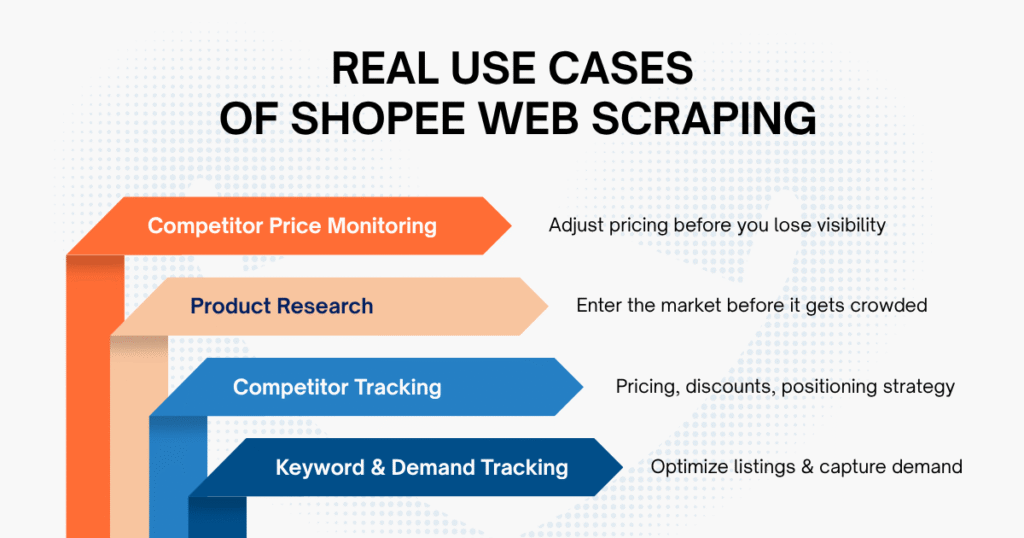
- Competitor Price Monitoring: Know how much competitors are selling for and when they change prices to adjust in a timely manner.
- Product Research: Detect products showing growth signs early on before they become trends.
- Competitor Tracking: Understand how competitors price their products, run discounts, and position their offerings.
- Keyword & Demand Tracking: Know what users are searching for to optimize product listings and sales strategies.
Easy Data – Actionable Shopee Data without Complexity
If you’ve been doing Shopee web scraping for long enough, you’ll notice one thing quite clearly: getting the data isn’t that hard; it’s maintaining a consistent and stable data flow that’s “the biggest headache”.
At first, the Shopee web scraping system runs smoothly and delivers data, but over time, familiar issues start to resurface: getting blocked, inconsistent data, or simply Shopee changing its layout… At this point, instead of using the data to make decisions, the team ends up spending time and effort just keeping the system running.
Easy Data has encountered this situation frequently while working with e-commerce teams in Southeast Asia. That’s why our services are designed with a simpler approach: you no longer need to worry about data collection, just focus on using the data.
Specifically, Easy Data’s Shopee data scraping service:
- Data is retrieved directly from the Shopee website (and the app if needed)
- Fully customizable to your exact needs: products, prices, keywords, search queries, etc.
- Supports multiple Southeast Asian markets (Vietnam, Thailand, Indonesia, etc.)
- And data is updated according to your chosen schedule (real-time, daily, weekly)
What you actually get:
- Clean, ready-to-use data
- No need to worry about proxies, blocks, or script modifications
- No time spent maintaining the system
If you’re currently in a phase where you have to “chase data” every day, you might want to try a more streamlined approach.
Final thought
Shopee is a rapidly evolving marketplace. Therefore, for e-commerce teams, Shopee web scraping is no longer just an advantage; it’s practically a necessity if you want to keep up with the market.
In reality, once you have a well-structured system in place, data collection isn’t too difficult. The real challenge lies in ensuring the data is always accurate, complete, and runs smoothly every day.
There is no “one-size-fits-all” solution. But when you clearly understand what you need and where your challenges lie, there will always be a more suitable and effective approach tailored to your specific team.
Is Shopee web scraping legal in Southeast Asia?
Shopee web scraping is generally legal if you only collect publicly available data and comply with local regulations such as PDPA (in Southeast Asia) or GDPR (if applicable). However, you should always review Shopee’s Terms of Service and avoid aggressive scraping that may disrupt the platform.
What data can you extract from Shopee web?
You can extract a wide range of publicly available data, including:
- Product name and description
- Price and discount information
- Seller/store details
- Ratings and reviews
- Sales volume and ranking
This data is commonly used for competitor analysis, pricing strategy, and product research.
How often should Shopee data be scraped?
It depends on your use case:
- Price monitoring → hourly or daily
- Market research → daily or weekly
- Trend analysis → weekly
High-frequency scraping requires stronger infrastructure to avoid blocking.
What is the best way to scrape Shopee in 2025?
The best method depends on your goal:
- For quick testing → use no-code tools
- For flexibility → build a custom scraper (Selenium / Playwright)
- For scale → use a managed data service
For most businesses, combining scraping with proxy rotation and data validation is the most reliable approach.
Is it better to use Shopee API or Shopee web scraping?
- API → more stable but limited access
- Web scraping → more flexible but requires maintenance
If you need full market data, scraping is usually the better option.
How can I avoid getting blocked when scraping Shopee?
To reduce blocking risks:
- Add delays between requests
- Rotate IP addresses (proxies)
- Use headless browsers
- Implement retry logic
These are essential for stable Shopee web scraping at scale.
Leave a Reply