


Introduction: Why Web Scraping from Websites is Essential for Business Growth
Web scraping from websites turns selected page content into records you can compare. For an ecommerce project, start with a specific question: how does the delivered price of the same product variant differ across a defined set of listings?
The seven steps below cover source selection, retrieval, parsing, dynamic content, storage and analysis. A fictional offline Python exercise shows how to preserve missing prices and flag ambiguous values before using the data.
Typical uses: compare advertised prices, record displayed availability, summarize permitted review samples and track changes in a defined product set. Displayed availability is not a warehouse stock count; a listing sample is not the whole market.
Building and maintaining scrapers takes ongoing work: page layouts change, fields disappear and access rules differ. A managed service can reduce implementation work, but scope, validation and refresh schedules still need agreement. See Easy Data’s scraping services for the available service pages.
This guide is a workflow and a reproducible parsing exercise, not a crawler for a named marketplace. It does not implement live requests, login, pagination or browser automation. For tool selection, use our comparison of scraping tools.
- Introduction: Why Web Scraping from Websites is Essential for Business Growth
- What is Web Scraping from Websites?
-
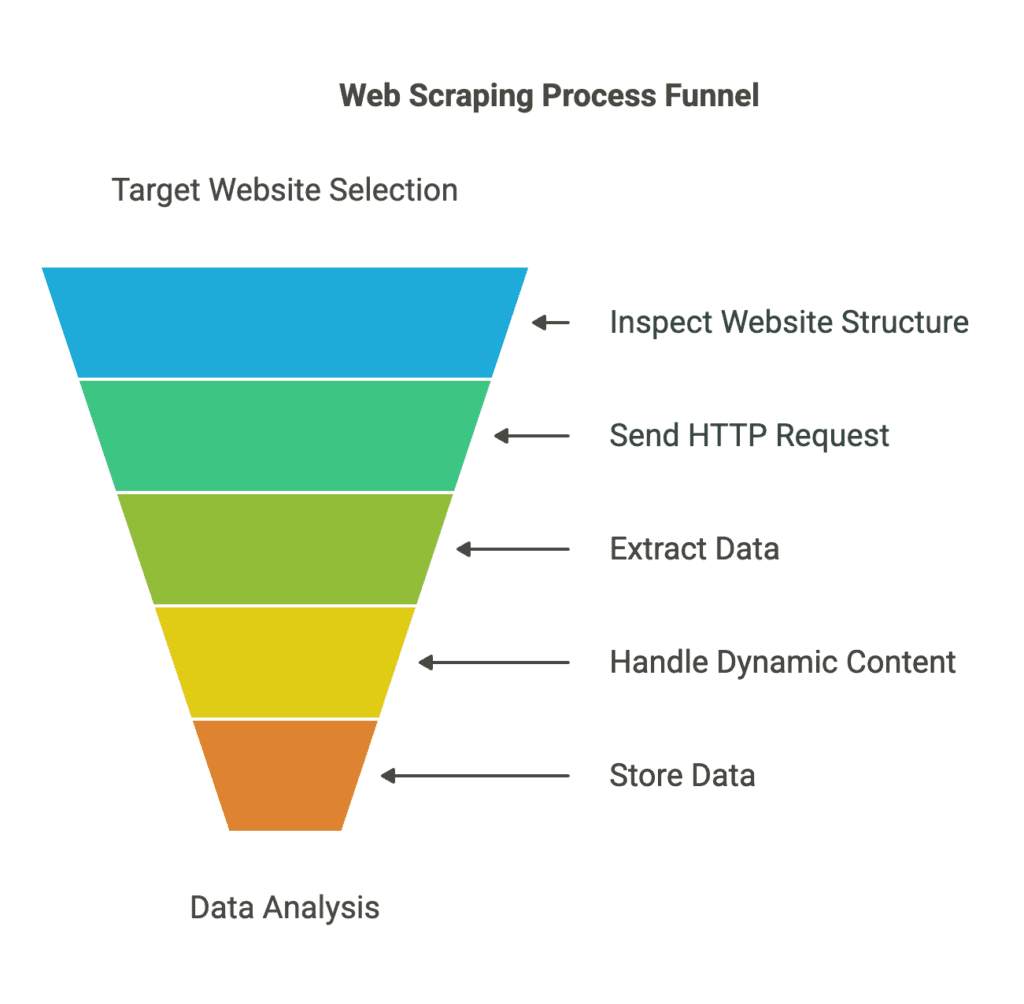
Step-by-Step Guide to Web Scraping from Websites
- Step 1: Choose the Target Website
- Step 2: Inspect the Website’s Structure
- Step 3: Send an HTTP Request to the Website
- Step 4: Extract Data with a Parsing Library
- Step 5: Handle Dynamic Websites with Headless Browsers
- Step 6: Store the Extracted Data in a Structured Format
- Step 7: Analyze and Utilize the Data for Business Decisions
- How Easy Data Automates Web Scraping from Websites
- Legal Considerations for Web Scraping
- Final Thoughts: The Future of Web Scraping from Websites
What is Web Scraping from Websites?
Web scraping extracts selected information from website content into a structure such as rows or JSON records. Retrieval gets the content; parsing locates fields; validation checks whether those fields mean what the project expects. These are separate responsibilities.
Automation makes repeated collection possible, but it can repeat an incorrect selector just as efficiently. Check required fields, duplicate identities, currencies and collection times against a reviewed sample before increasing volume.
🔎 Example Use Cases of Web Scraping:
- Ecommerce teams → Compare permitted advertised prices for matched product variants.
- Marketing agencies → Summarize themes in a permitted review sample, keeping sampling limits explicit.
- Real estate researchers → Compare licensed listing attributes; asking prices are not completed sale prices.
- Financial researchers → Monitor permitted news metadata; use an appropriately licensed price feed for trading-grade market data.
Step-by-Step Guide to Web Scraping from Websites
Step 1: Choose the Target Website
Define the target pages and the decision the data will support. Write a brief containing the market, product variants, required fields, collection frequency, permitted uses and an acceptance sample. Check whether an authorized API, export or licensed feed already meets that brief.
Examples of marketplace research scope—not confirmation of access or field coverage:
- Amazon → Product listings and advertised prices, subject to the permitted source and fields (www.amazon.com)
- eBay → Listing and auction research within the authorized data scope (www.ebay.com)
- AliExpress → Displayed product and seller attributes; verify seller claims separately (www.aliexpress.com)
Access check: review site terms, API conditions and crawler rules before collection. RFC 9309 explains that robots.txt rules are not access authorization. A path being allowed there does not settle permission, privacy or reuse rights.
Step 2: Inspect the Website’s Structure
Inspect both the received HTML and the rendered page. A field visible on screen may have arrived in the initial document, embedded data or a later request. Identify the actual source before choosing a parser or browser.
🔍 How to Inspect a Website’s Code:
- Right-click on the webpage and select Inspect Element (Chrome/Firefox).
- Find the HTML tags (
<div>,<span>,<table>) where the data is stored. - Identify CSS Selectors or XPath for precise data extraction.
Selector check: test several cards, including one with a missing price. Select fields inside each product card so a missing field cannot shift values onto the next product. Recheck selectors after template changes.
Step 3: Send an HTTP Request to the Website
For an authorized HTML source, use a bounded request and check the response before parsing. In Python Requests, set an explicit timeout, call raise_for_status(), and validate the expected content type and page structure. A successful HTTP response can still contain a login or challenge page. See the Requests quickstart.
Choose the documented method: GET commonly retrieves a resource; POST submits data or invokes a documented operation. Do not replay login or form requests merely because they appear in a browser trace. Credentials and nonpublic data need a separately authorized workflow.
Request-tool choices:
- Python: Requests for bounded HTTP retrieval.
- JavaScript: Axios where its request and error handling suit the application.
- Fetch-capable JavaScript environments:
fetch(), with explicit HTTP-status and timeout handling.
Failure policy: cap attempts and concurrency, respect documented rate limits and stop for access-denied or challenge responses. Log the status and affected URL for review. Changing proxies or user agents does not guarantee access or permission. Use our CAPTCHA response and missing-data worksheet to distinguish challenge responses, rate limits and incomplete records.
Step 4: Extract Data with a Parsing Library
Parse only content you have obtained through the agreed access method. Treat extraction and validation separately: retain a raw value for review, then produce a normalized value only when its meaning is clear.
Different tool roles: Beautiful Soup locates elements in HTML/XML; Scrapy coordinates a larger crawling workflow; Cheerio parses markup in JavaScript without rendering a page or executing its scripts.
Offline exercise: with Python 3 and the beautifulsoup4 package installed, run the example below. Its three product cards are invented. It accepts only nonnegative USD amounts with a decimal point and at most two decimal places. Ranges, localized separators and other currencies require a separate rule; they are flagged rather than guessed.
Copied!import re from decimal import Decimal from bs4 import BeautifulSoup # Fictional local HTML: no website request is made. fixture = """ <article data-id="A"><h2>Tea & coffee set</h2> <span class="price" data-currency="USD">19.90</span></article> <article data-id="B"><h2>Storage jar</h2></article> <article data-id="C"><h2>Travel cup</h2> <span class="price" data-currency="USD">12-15</span></article> """ def parse_products(markup): rows = [] for card in BeautifulSoup(markup, "html.parser").select("article"): title = card.select_one("h2") price = card.select_one(".price") product_id = (card.get("data-id") or "").strip() name = title.get_text(" ", strip=True) if title else "" raw = price.get_text(" ", strip=True) if price else "" currency = (price.get("data-currency") or "") if price else "" issues = [] if not product_id or not name: issues.append("missing_identity") amount = None if not raw: issues.append("missing_price") elif currency != "USD": issues.append("unsupported_currency") elif not re.fullmatch(r"[0-9]+(?:[.][0-9]{1,2})?", raw): issues.append("review_price_format") else: amount = format(Decimal(raw), ".2f") rows.append(dict(product_id=product_id, name=name, currency=currency, raw_price=raw, price=amount, status=";".join(issues) or "ok")) return rows rows = parse_products(fixture) for row in rows: print(row["product_id"], row["price"], row["status"])
Expected output: A → 19.90 / ok; B → None / missing_price; C → None / review_price_format. A zero price remains 0.00. No product card is discarded; an absent ID or title is separately flagged. “ok” means these limited checks passed, not that a live listing is accurate. The exercise does not detect duplicate IDs or validate a site-specific currency format.
Step 5: Handle Dynamic Websites with Headless Browsers
JavaScript content does not automatically require a headless browser. First check the initial response, embedded data and any documented, authorized endpoint. The Scrapy dynamic-content guide describes this source-first approach. Use browser rendering only when the permitted workflow actually needs it; then parse the resulting content.
Browser automation: Selenium WebDriver automates browsers; Puppeteer is a JavaScript library for controlling Chrome or Firefox. They are automation tools, not data-quality guarantees. Browser execution also adds resource and maintenance costs.
Wait for evidence: use a bounded wait for the required element or response instead of arbitrary delays. Record timeouts as failed or incomplete collection, rather than exporting a blank page as a successful result. No browser is needed for this article’s offline fixture.
Step 6: Store the Extracted Data in a Structured Format
Store a clear schema alongside the records. A live project should retain the source URL, product and variant IDs, collection time with timezone, market, currency, raw value, normalized value and validation status. The fixture below is smaller because it has no live source or collection event.
Choose storage by use: CSV or a spreadsheet suits a reviewed flat sample; JSON can preserve nested structures; a database supports repeated queries and controlled updates. A cloud platform is a hosting choice, not a data format or a guarantee of real-time delivery.
Scheduling: repeated collection creates snapshots at the chosen interval, not a continuous live feed. Define how missed runs, duplicate keys and retention are handled. Do not treat a product disappearing from one response as proof that it was sold out.
Run this after Step 4 to serialize the three fixture rows. Python’s CSV documentation covers dictionary-based writing and newline handling. Missing normalized prices become empty cells; the status column preserves the reason. Keep imported text as text when opening untrusted exports in a spreadsheet.
Copied!import csv import io # Reuse rows from Step 4; create CSV text without writing a file. buffer = io.StringIO(newline="") fields = ["product_id", "name", "currency", "raw_price", "price", "status"] writer = csv.DictWriter(buffer, fieldnames=fields) writer.writeheader() writer.writerows(rows) csv_text = buffer.getvalue() assert len(list(csv.DictReader(io.StringIO(csv_text)))) == 3 print(csv_text)
Step 7: Analyze and Utilize the Data for Business Decisions
Validate the sample before drawing a business conclusion. Match the same variant, pack size, currency, destination and collection period. Preserve unknown shipping, tax or price values; do not silently convert them to zero.
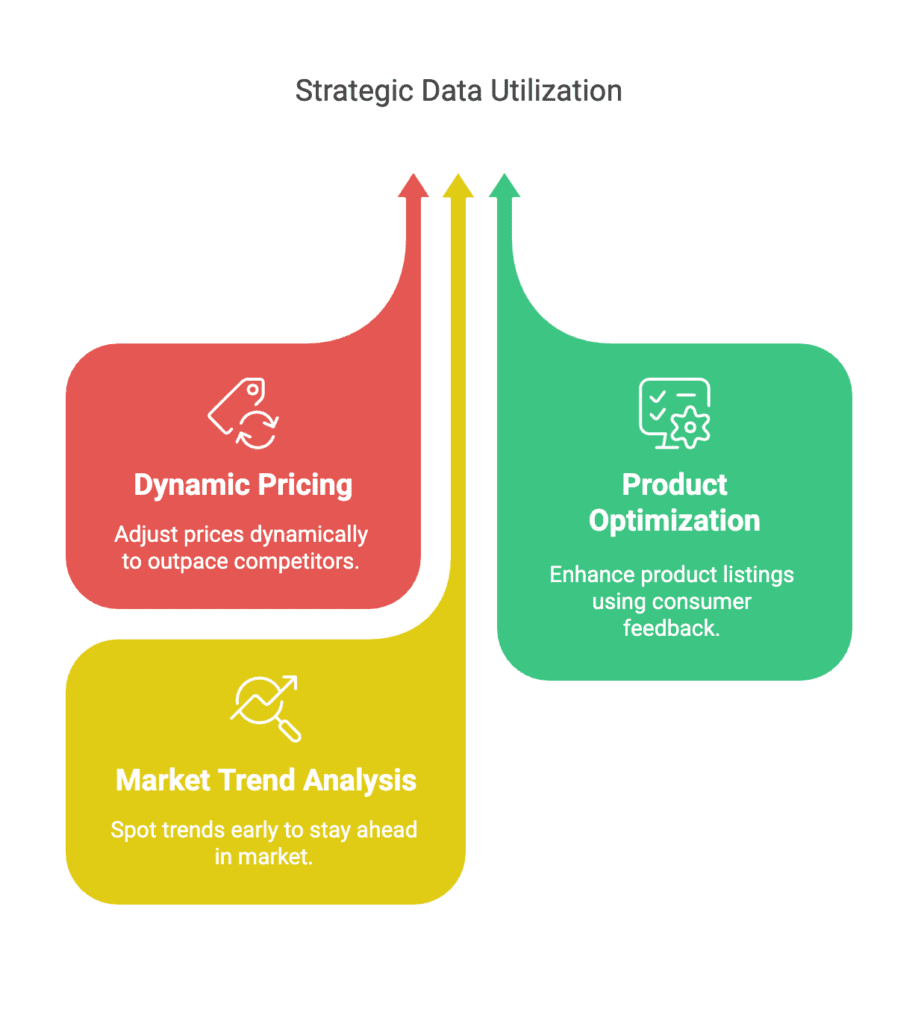
Use data to answer a bounded question: compare delivered prices for matched offers, summarize themes in a permitted review sample, or track the same product set over time. Reviews are a self-selected sample and displayed sales counters are not audited transaction records.
In the fixture, one of three rows has a usable price. That is a completeness result for this invented exercise, not a market statistic. Do not rank products B and C as cheapest because their normalized prices are missing. For a checked shipping-and-variant comparison, see our worked product-price example.
How Easy Data Automates Web Scraping from Websites
A managed extraction project still needs a written brief and acceptance checks. Share target URLs, markets, fields, intended use, desired schedule and delivery format with Easy Data, then confirm feasible coverage and a sample before ordering.
Why Choose Easy Data?
Questions to agree before work starts:
Which pages and fields are in scope?
How are missing values and changes reported?
What refresh interval and delivery format are available?
Which sample checks define an acceptable delivery?
Do not assume every source supports historical prices, exact stock quantities or instant updates. Ask how each requested field is obtained and what its limitations are. Our AI-assisted extraction guide also explains why generated output still needs validation.
Prepare your brief: contact Easy Data with the source pages and required fields.
Legal Considerations for Web Scraping
Access and reuse depend on the source, data and jurisdiction. Review applicable terms, licensing and privacy requirements for the actual project. Technical access alone does not establish a right to collect, store or republish content.
Project checks: follow applicable crawler rules; prefer an authorized API or export where suitable; use only the permitted fields and purposes; minimize retained personal information and define deletion rules. Review authenticated access separately rather than treating it as public content.
Public visibility does not remove privacy obligations: the joint statement hosted by the ICO explains this for publicly accessible personal information. A robots.txt check or an “ethical scraping” label is not a legal guarantee; obtain advice for the relevant project where needed.
Final Thoughts: The Future of Web Scraping from Websites
A useful scraping workflow connects a defined question to a permitted source, tested extraction rules and a reviewable output. The seven steps are iterative: a missing field or changed template can send you back to the brief or source inspection.
Start with a small reviewed sample. Increase coverage only after identity, price, missing-value and freshness checks work for that source. Track failures alongside successes so a larger file does not conceal gaps.
Need help scoping the collection? Contact Easy Data with your sample URLs and intended analysis.
Leave a Reply