

Shopee data crawling is often mentioned as a technical capability, but its real value only becomes clear when viewed through practical use cases. This guide focuses on concrete Shopee data crawling examples and explains how teams actually use them to explore markets, test assumptions, and support early-stage analysis. The goal is to clarify what can be crawled, how it is commonly approached, and in which situations these examples are most useful.
What Is Shopee Data Crawling?
Shopee data crawling refers to the automated collection of publicly available data from Shopee pages and its transformation into structured datasets for analysis. This may include product listings, prices, sellers, ratings, reviews, or category-level information.
What makes Shopee data crawling valuable is not automation alone, but continuity. While manual checks show what the market looks like at a specific moment, crawling reveals how it evolves. Through repeated collection, teams can observe pricing behavior during campaigns, shifts in seller density, or changes in customer sentiment over time.
For many analysts and ecommerce teams, Shopee data crawling sits between exploration and validation: a way to observe the market systematically before committing to deeper operational investments.
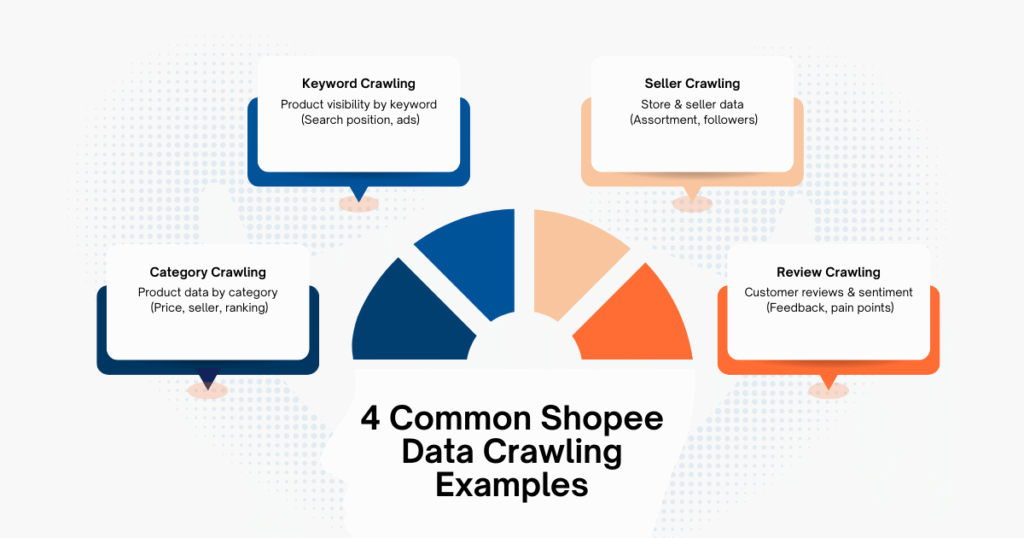
4 Common Shopee Data Crawling Examples
In reality, Shopee data crawling always starts with a question. Different questions lead to different crawling approaches. The following Shopee data crawling examples reflect how teams typically explore Shopee data in real-world scenarios.
Example 1 – Crawling Shopee Product Data by Category
Category-based crawling is one of the most widely used Shopee data crawling examples. It focuses on category listing pages to collect product-level information such as names, prices, discounts, sellers, and ranking positions. Teams commonly use this approach to:
- Estimate category size and competitive density
- Analyze price distribution within a category
- Track how dominant sellers or brands change over time
This example is particularly useful for market sizing and category research. However, it requires careful interpretation. During major sales events, rankings and prices can fluctuate sharply, so insights only emerge when data is collected consistently across comparable time windows.
Example 2 – Crawling Shopee Product Data by Keyword
Keyword-based crawling shifts the focus from category structure to search-driven visibility. This Shopee data crawling example helps teams understand how products compete under specific search terms. Typical applications include:
- Keyword-level competition analysis
- Visibility tracking for priority product types
- Early detection of demand signals around emerging keywords
This approach is often used by growth and acquisition teams. However, sponsored placements and personalization can distort results, making normalization and repeated observation essential.
Example 3 – Crawling Shopee Store & Seller Data
Seller-focused crawling moves beyond individual products and examines who is driving competition. This Shopee data crawling example targets seller profiles, storefront listings, follower counts, and activity signals. It is commonly used to:
- Identify fast-growing or aggressive sellers
- Monitor new seller entry into strategic categories
- Compare assortment depth and positioning across competitors
Seller crawling provides valuable context for competitive analysis, but it can be more complex due to inconsistent store layouts and market-specific differences.
Example 4 – Crawling Shopee Reviews for Consumer Insights
Reviews represent one of the richest qualitative data sources on Shopee. Crawling reviews allows teams to aggregate consumer feedback at scale. This Shopee data crawling example is often applied to:
- Product quality benchmarking
- Feature gap and pain-point analysis
- Monitoring shifts in customer satisfaction over time
The challenge lies less in extraction and more in interpretation. Review crawling becomes most valuable when combined with aggregation, tagging, or sentiment analysis rather than treated as raw text alone.
A Comprehensive Guide for Shopee Data Crawling
Once teams become familiar with different Shopee data crawling examples, a broader question usually follows: how does this process work as a whole, beyond individual use cases?
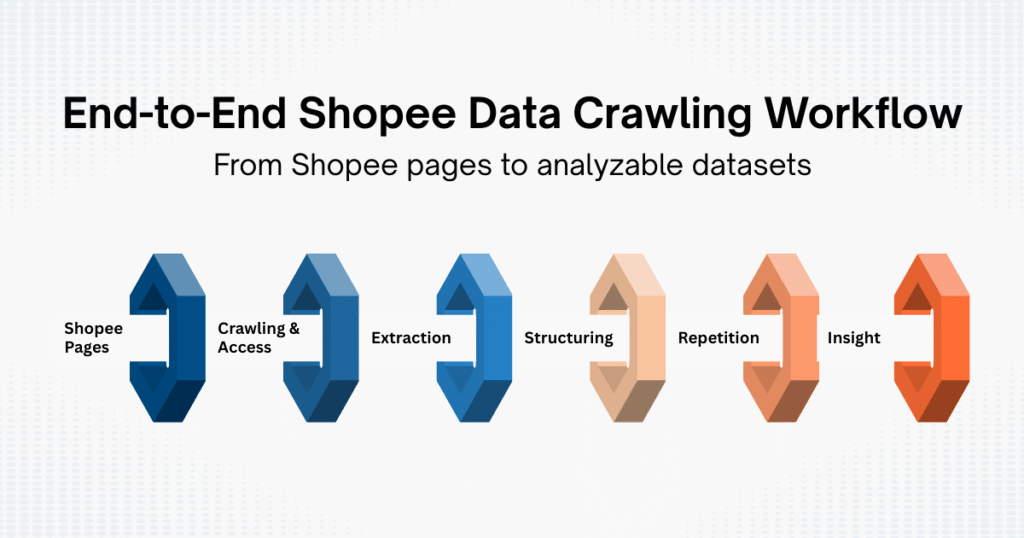
By connecting the dots, it becomes easy to outline how Shopee data crawling is typically approached end to end, helping teams understand the workflow behind the Shopee data crawling examples without turning the discussion into a production-level tutorial.
Understanding What You Are Really Crawling on Shopee
Shopee is not a static website. Prices, rankings, and visibility change constantly due to campaigns, seller behavior, and platform mechanics.
From a crawling perspective, Shopee data usually appears in three layers:
- Listing-level data: products, prices, sellers
- Contextual metadata: category placement, keyword position, sponsored tags
- Behavioral signals: reviews, ratings, stock indicators
Effective Shopee data crawling starts by choosing the layer that aligns with the business question. Crawling everything rarely improves insight and often increases noise.
From Page Access to Data Retrieval
Most Shopee data crawling examples begin with accessing publicly available pages: category listings, search results, product pages, or seller storefronts.
What matters here is consistency:
- The same page types
- The same parameters
- The same collection intervals
Without this discipline, crawled Shopee data becomes difficult to compare over time, especially around major campaign periods.
Extracting Data With Structure in Mind
After retrieving page content, crawlers identify repeatable elements such as product cards, price blocks, seller names, or review items.
At this stage, Shopee data crawling defines its analytical units:
- One product card becomes one row
- One seller block becomes one entity
- One review becomes one observation
Errors here are subtle but costly. Poor structure leads to misleading comparisons later, which is why even basic Shopee data crawling examples emphasize stable, repeatable extraction logic.
Turning Raw Shopee Data Into Usable Datasets
Raw HTML or JSON outputs have little analytical value on their own. Shopee data crawling becomes meaningful only after transformation into structured datasets.
This typically involves:
- Normalizing price formats
- Aligning products across sellers
- Separating base prices from promotional signals
At this point, crawling stops being purely technical and becomes an analytical exercise.
Repetition: Where Crawling Turns Into Insight
A single crawl shows what the market looks like today.
Repeated crawling reveals how it behaves.
Most Shopee data crawling examples only deliver insight when observed across time:
- Tracking price movement across campaigns
- Monitoring seller entry and exit
- Observing review accumulation and sentiment trends
Repetition adds complexity, but it is also what turns crawling into a decision-support tool.
Where Example-Based Crawling Starts to Break Down
Shopee data crawling examples work well for exploration, hypothesis testing, and early analysis. Over time, however, limitations emerge:
- Page layouts change during campaigns
- Anti-bot mechanisms intensify
- Data volumes outgrow manual handling
Beyond technical constraints, data quality and bias also become harder to control as scraping scales. Sampling effects, missing data during high-traffic periods, and platform-driven visibility rules can quietly distort analysis if not monitored carefully. Recognizing these limits helps teams decide whether crawling remains an internal experiment or evolves into a long-term data pipeline.
Best Practices for Shopee Data Crawling
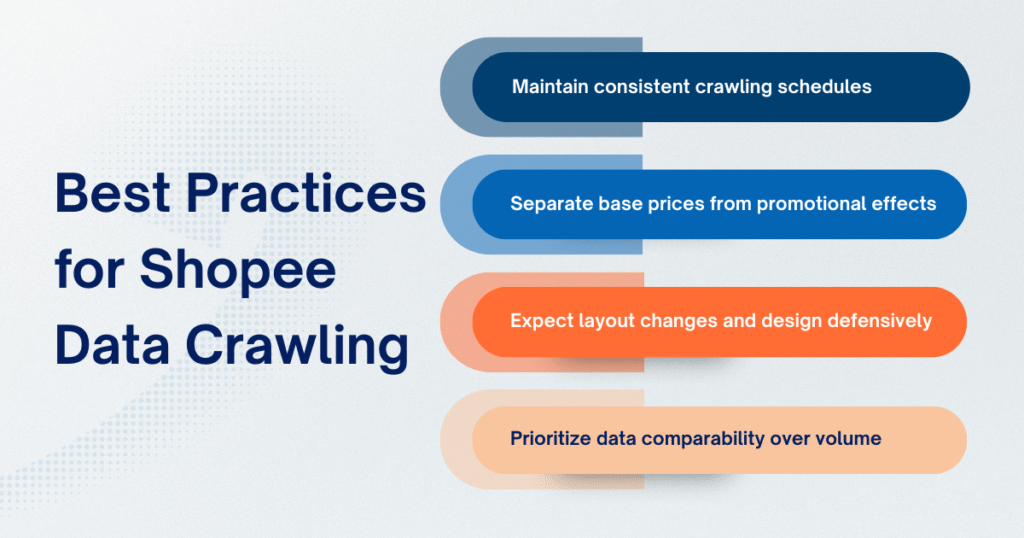
Across different Shopee data crawling examples, several practices consistently improve reliability:
- Maintain consistent crawling schedules: Crawling at the same time intervals helps reduce campaign-driven noise and makes week-to-week or month-to-month comparisons meaningful.
- Separate base prices from promotional effects: Without distinguishing base prices from discounts or vouchers, price movements can easily be misread as structural changes rather than temporary campaign tactics.
- Expect layout changes and design defensively: Shopee frequently adjusts page structures during major events, so crawlers should be built to tolerate missing fields or minor layout shifts instead of failing completely.
- Prioritize data comparability over volume: Collecting less data that can be reliably compared over time often produces clearer insight than large datasets filled with inconsistencies.
These principles help ensure that Shopee data crawling supports analysis rather than undermining it.
When to Use a Shopee Data Crawling Service
Shopee data crawling examples are particularly useful when teams are still exploring a market. They help answer early questions, validate assumptions, and build intuition around how Shopee data behaves. For category scouting, competitor mapping, or short-term analysis, these examples often provide enough clarity to move forward.
As crawling expands across more categories, markets, or longer time horizons, teams begin to feel friction in places that weren’t obvious at the start. Page layouts change during campaign periods. Data structures evolve without notice. Small inconsistencies in extraction logic start to affect comparisons across weeks or months. What was once an exploratory exercise gradually turns into a recurring operational task.
At this stage, the challenge is no longer how to crawl Shopee data, but how to keep the data reliable over time.
Many teams reach a point where maintaining crawling scripts, fixing breakages, and revalidating datasets consumes more effort than the analysis itself. This is especially true when Shopee data becomes a recurring input for pricing decisions, category planning, or competitive monitoring. The risk is not just technical debt, but analytical drift (when insights become harder to trust because the underlying data is no longer consistent).
At this time, professional Shopee data crawling services are the optimal solution for teams to consider. Rather than optimizing individual crawls, these services are built around continuity: stable data collection, adaptation to platform changes, and normalization that preserves comparability across time.
At Easy Data, Shopee data crawling service is designed around this reality. The service is fully customized, allowing businesses to define exactly what to crawl, which markets to cover, and how frequently data should be updated (daily, weekly, monthly, or aligned with specific campaign windows). Data is refreshed continuously and delivered in structured formats, so teams can focus on interpreting market signals instead of maintaining crawling systems.
Conclusion
Shopee data crawling examples provide a practical lens for understanding how marketplace data is collected and used in real business contexts. By examining categories, keywords, sellers, and reviews, teams gain clarity on what Shopee data can reveal and how it supports early decision-making.
While example-based crawling builds understanding, long-term insight depends on consistency, structure, and scalability. Whether through internal experimentation or managed services, Shopee data crawling delivers the most value when it supports ongoing analysis rather than isolated observation.
Leave a Reply