

In the dynamic and rapidly evolving e-commerce landscape of Southeast Asia (SEA), Shopee continues to dominate as a leading platform for sellers targeting the region’s burgeoning online market. With SEA’s e-commerce market projected to surpass $150 billion by 2025, Shopee’s 45% market share underscores its pivotal role in the region. To thrive in this competitive environment, Shopee sellers must harness the power of analytics tools to optimize store performance, decode customer behavior, and outmaneuver competitors. These tools provide critical insights into sales trends, traffic sources, and market dynamics, enabling data-driven decisions that fuel growth and profitability.
This article delves into the top 7 Shopee analytics tools for 2025 that every SEA seller should integrate into their operations. From Shopee’s native tools to advanced third-party platforms, these solutions cater to businesses of all sizes, offering actionable insights to boost efficiency, enhance customer satisfaction, and maximize revenue. We’ll explore each tool’s features, benefits, and ideal use cases, alongside a comparison table to help sellers choose the best tool for their needs and practical tips to leverage these tools effectively.
Why Shopee Analytics Tools Matter for SEA Sellers?
Shopee analytics tools are indispensable for sellers aiming to stay competitive in SEA’s fast-paced e-commerce ecosystem. These tools empower sellers to:
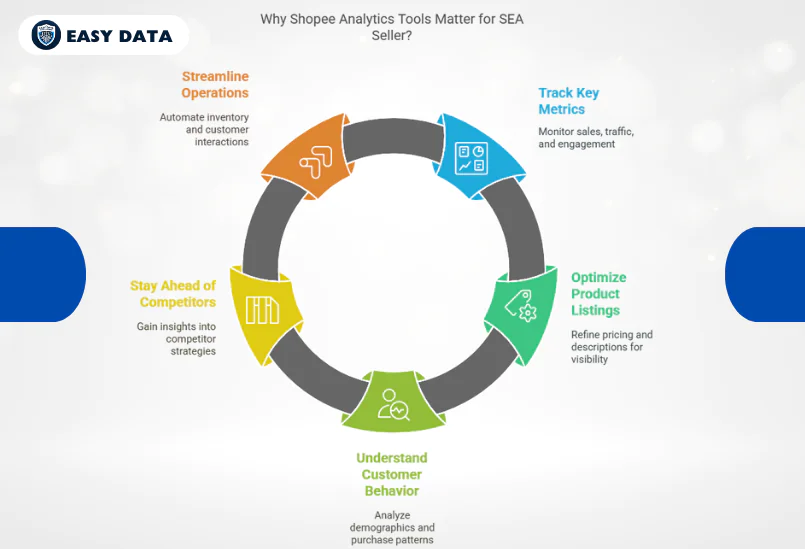
- Track Key Metrics: Monitor sales, traffic, conversion rates, and customer engagement to gauge store performance.
- Optimize Product Listings: Identify high-performing products and refine pricing, descriptions, and keywords for better visibility.
- Understand Customer Behavior: Analyze buyer demographics, purchase patterns, and cart abandonment to tailor marketing strategies.
- Stay Ahead of Competitors: Gain insights into competitor pricing, product trends, and promotional strategies to maintain a competitive edge.
- Streamline Operations: Automate inventory management, pricing adjustments, and customer interactions to save time and reduce errors.
With Shopee commanding a massive user base across countries like Indonesia, Vietnam, Thailand, and the Philippines, leveraging analytics tools is no longer optional—it’s a necessity for scaling operations and achieving long-term success.
Read more: 10 Strategies to Maximize Shopee Sales Data in 2025
Comparison of Top 7 Shopee Analytics Tools
The following table compares the top 7 Shopee analytics tools based on key criteria to help SEA sellers choose the right tool for their business:
| Tool | Cost | Key Features | Best For | Ease of Use | Multi-Channel Support |
| Shopee Seller Center | Free | Sales performance, traffic insights, customer data, campaign analytics | Beginners, small sellers seeking a free solution | High | No |
| SELLinALL | Subscription-based | Inventory sync, order/financial reporting, analytics dashboard, bulk listing | Multi-channel sellers managing multiple platforms | Moderate | Yes |
| Konigle | Subscription-based | Dynamic pricing, profit analytics, inventory tracking, customizable dashboards | Sellers focused on automation and profitability | High | Limited |
| Shopee Analytics | Subscription-based | Product/shop analysis, keyword tracking, market trends | Sellers prioritizing competitor research and keyword optimization | High | No |
| Zhixia Data Platform | Subscription-based | Browser plugin, pricing calculator, mobile access, sales forecasting | Sellers needing real-time data and pricing optimization | High | No |
| Google Analytics | Free (with integration setup) | Acquisition/behavior reports, custom dashboards, e-commerce tracking | Sellers running multi-channel marketing campaigns | Moderate | Yes |
| PowerSell | Subscription-based | Unified chat, real-time stock sync, performance analytics, automated responses | High-volume sellers managing customer interactions and inventory | Moderate | Yes |
Top 7 Shopee Analytics Tools for 2025
1. Shopee Seller Center
Overview: Shopee Seller Center is the platform’s native analytics and management tool, offering a centralized dashboard for tracking and optimizing store performance. Accessible to all Shopee sellers, it provides real-time data to inform strategic decisions.
Key Features:
- Sales Performance: Track total sales, revenue growth, average order value (AOV), and order trends over time.
- Traffic Insights: Analyze traffic sources (e.g., organic search, Shopee Ads, social media) and page views to optimize marketing efforts.
- Customer Data: Gain insights into buyer demographics, repeat purchase rates, and cart abandonment patterns.
- Campaign Analytics: Monitor the performance of Shopee Ads and promotional campaigns to maximize ROI.
Why It’s Essential: As a free, built-in tool, Shopee Seller Center is an ideal starting point for both new and established sellers. Its intuitive interface and real-time updates make it easy to monitor performance and adjust strategies on the fly. The tool also integrates seamlessly with Shopee’s promotional features, such as discounts and flash sales, to boost visibility.
Best For: Sellers seeking a cost-effective, user-friendly solution for basic analytics and store management.
Pro Tip: Use the traffic insights to identify underperforming product listings and optimize their titles, descriptions, and images to improve search rankings.
2. SELLinALL
Overview: SELLinALL is a multi-channel management platform designed to simplify operations for Shopee sellers who also operate on other marketplaces like Lazada, Amazon, or TikTok Shop. It offers robust analytics and inventory synchronization to streamline cross-platform selling.
Key Features:
- Inventory Management: Syncs stock levels across multiple platforms to prevent overselling and stockouts.
- Order and Financial Reporting: Tracks orders, refunds, and revenue across channels in a unified dashboard.
- Analytics Dashboard: Provides insights into sales trends, top-performing products, and channel-specific performance.
- Bulk Listing Tools: Enables sellers to upload and manage product listings across platforms efficiently.
Why It’s Essential: SELLinALL’s ability to centralize analytics and operations makes it a game-changer for sellers managing multiple e-commerce channels. Its real-time synchronization minimizes errors, while its detailed reports help sellers identify growth opportunities across SEA markets.
Best For: Multi-channel sellers needing a centralized platform for analytics, inventory, and order management.
Pro Tip: Leverage SELLinALL’s financial reporting to compare profitability across platforms and allocate marketing budgets to the most lucrative channels.
3. Konigle
Overview: Konigle is an e-commerce optimization platform that automates pricing, inventory, and analytics for Shopee sellers. Its focus on profitability and efficiency makes it a favorite among data-driven sellers.
Key Features:
- Dynamic Pricing Automation: Adjusts prices in real-time based on market demand, competitor pricing, and stock levels.
- Profit Analytics: Generates detailed reports on profit margins, sales performance, and operational costs.
- Inventory Tracking: Sends alerts for low stock levels to prevent overselling and ensure timely restocking.
- Performance Dashboards: Offers customizable dashboards to monitor key metrics like conversion rates and AOV.
Why It’s Essential: Konigle’s automation features save time and boost profitability by ensuring optimal pricing and inventory management. Its actionable insights help sellers stay agile in a competitive market, while its user-friendly interface simplifies complex data analysis.
Best For: Sellers focused on automation, profitability analysis, and operational efficiency.
Pro Tip: Use Konigle’s dynamic pricing feature to run limited-time discounts during Shopee’s mega sales events (e.g., 11.11 or 12.12) to attract price-sensitive buyers.
4. Shopee Analytics (ShopeeAnalytics.com)
Overview: Shopee Analytics is a third-party tool specializing in competitive and market intelligence. It provides in-depth data on products, shops, and trends across Shopee’s platform, covering over 120,000 stores.
Key Features:
- Product Analysis: Tracks pricing, sales volume, and conversion rates for over 1 million products.
- Shop Insights: Analyzes competitor metrics, including follower count, response rate, and estimated revenue.
- Keyword Tracking: Identifies trending keywords and search terms to optimize product listings for better discoverability.
- Market Trends: Highlights emerging product categories and consumer preferences in SEA.
Why It’s Essential: Shopee Analytics offers a competitive edge by providing granular insights into competitor strategies and market dynamics. Its keyword tracking feature is particularly valuable for improving product visibility and driving organic traffic.
Best For: Sellers prioritizing competitor research, keyword optimization, and market trend analysis.
Pro Tip: Use the keyword tracking tool to identify long-tail keywords with low competition and incorporate them into your product titles and descriptions.
5. Zhixia Data Platform
Overview: Zhixia is a big data SaaS platform tailored for Shopee sellers, offering real-time analytics through a browser plugin and mobile access. Its focus on pricing and operational efficiency makes it a versatile tool for SEA sellers.
Key Features:
- Browser Plugin: Displays product and competitor data directly on Shopee’s website for quick analysis.
- Pricing Calculator: Calculates optimal pricing based on cost, shipping fees, weight, and desired profit margins.
- Mobile Access: Provides operational insights via a WeChat mini-program for on-the-go management.
- Sales Forecasting: Predicts sales trends based on historical data and market conditions.
Why It’s Essential: Zhixia’s real-time data access and mobile-friendly interface make it ideal for sellers who need to make quick, informed decisions. Its pricing calculator ensures sellers maintain healthy margins while staying competitive.
Best For: Sellers needing real-time data, pricing optimization, and mobile accessibility.
Pro Tip: Use Zhixia’s browser plugin during competitor research to compare pricing and stock levels directly on Shopee’s product pages.
6. Google Analytics (with Shopee Integration)
Overview: By integrating Google Analytics with Shopee, sellers can track off-platform traffic and customer journeys, complementing Shopee’s native analytics tools. This integration provides a holistic view of marketing performance.
Key Features:
- Acquisition Reports: Tracks traffic from external sources like social media, Google Ads, or email campaigns.
- Behavior Reports: Analyzes user interactions, from product page visits to checkout completions.
- Custom Dashboards: Allows sellers to create tailored dashboards for specific metrics, such as bounce rates or conversion funnels.
- E-commerce Tracking: Monitors revenue, transactions, and product performance from Shopee sales.
Why It’s Essential: Google Analytics excels at tracking external traffic sources, helping sellers refine off-platform marketing strategies. Its robust reporting capabilities provide deeper insights into customer behavior beyond Shopee’s ecosystem.
Best For: Sellers running multi-channel marketing campaigns or driving traffic from social media and paid ads.
Pro Tip: Set up custom dashboards to monitor the performance of social media campaigns driving traffic to your Shopee store, and adjust ad spend based on conversion rates.
7. PowerSell
Overview: PowerSell is an all-in-one platform that combines store management, customer service, and analytics for Shopee sellers. Its focus on streamlining operations and enhancing customer interactions makes it a powerful tool for high-volume sellers.
Key Features:
- Unified Chat Management: Integrates messages from Shopee, Facebook, and Instagram into a single interface.
- Real-Time Stock Sync: Synchronizes inventory across platforms to prevent overselling.
- Performance Analytics: Tracks sales, returns, customer satisfaction, and store performance metrics.
- Automated Responses: Uses AI to handle common customer inquiries, improving response times.
Why It’s Essential: PowerSell’s comprehensive approach streamlines operations, reduces response times, and enhances customer satisfaction. Its analytics features help sellers identify bottlenecks and optimize store performance.
Best For: Sellers managing high-volume customer interactions and inventory across multiple channels.
Pro Tip: Use PowerSell’s automated responses to handle repetitive inquiries during peak sales periods, freeing up time to focus on strategic tasks.
How to Choose the Right Shopee Analytics Tool for Your Business
Selecting the best Shopee analytics tool depends on your business size, goals, and operational needs. Refer to the comparison table above and consider the following factors:
- Budget: Shopee Seller Center and Google Analytics are free, making them ideal for startups or small businesses. Third-party tools like SELLinALL, Konigle, or Shopee Analytics require subscriptions but offer advanced features.
- Business Scale: Multi-channel sellers benefit from tools like SELLinALL or PowerSell, which support cross-platform management. Smaller sellers can rely on Shopee Seller Center for basic analytics.
- Feature Needs: Prioritize tools based on your priorities, such as automation (Konigle), competitor analysis (Shopee Analytics), or keyword optimization (Zhixia).
- Ease of Use: Tools like Zhixia and Shopee Seller Center offer intuitive interfaces for quick adoption, while SELLinALL and PowerSell cater to sellers comfortable with more complex platforms.
- Integration Requirements: Ensure the tool integrates seamlessly with Shopee and other platforms you use, such as social media or accounting software.
Tips to Maximize Shopee Analytics Tools in 2025
To fully leverage these tools and drive success on Shopee, follow these actionable strategies:
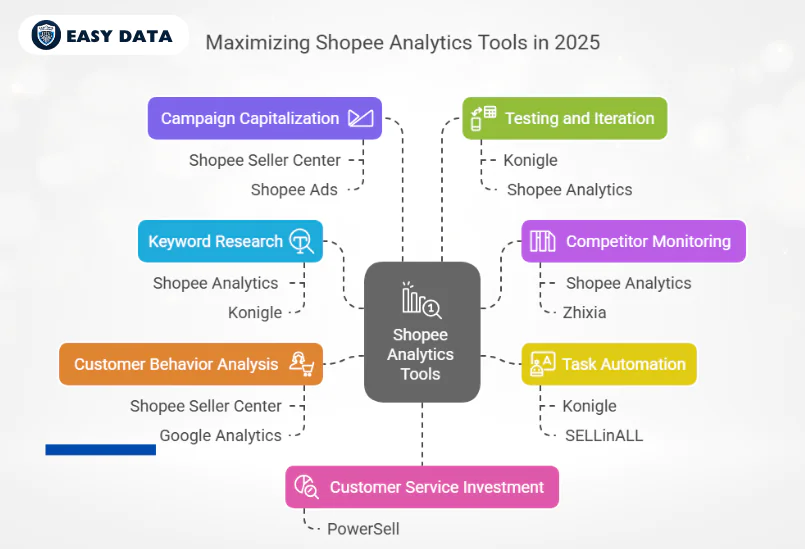
- Leverage Keyword Research: Use Shopee Analytics or Konigle to identify high-traffic, low-competition keywords. Incorporate these into product titles, descriptions, and tags to boost organic visibility.
- Monitor Competitors Closely: Tools like Shopee Analytics and Zhixia provide competitor insights. Regularly analyze their pricing, promotions, and product offerings to stay one step ahead.
- Automate Routine Tasks: Konigle and SELLinALL automate pricing, inventory, and listing updates. This frees up time for strategic activities like marketing and product development.
- Analyze Customer Behavior: Use Shopee Seller Center and Google Analytics to track buyer preferences, cart abandonment rates, and repeat purchases. Tailor promotions and product bundles to meet customer needs.
- Capitalize on Shopee Campaigns: Combine insights from Shopee Seller Center with Shopee Ads and promotional tools to maximize visibility during peak sales seasons, such as 9.9, 11.11, or 12.12.
- Test and Iterate: Continuously test pricing, product images, and listing descriptions using insights from Konigle or Shopee Analytics. Optimize based on what drives the highest conversions.
- Invest in Customer Service: Use PowerSell’s unified chat and automated responses to improve response times and customer satisfaction, which can boost store ratings and repeat purchases.
Conclusion
In 2025, Shopee analytics tools will be the cornerstone of success for SEA sellers navigating the region’s competitive e-commerce landscape. From the free, user-friendly Shopee Seller Center to advanced platforms like SELLinALL, Konigle, and Shopee Analytics, these tools provide the insights and automation needed to optimize performance, streamline operations, and drive sales. The comparison table above simplifies the decision-making process, helping sellers choose the tool that aligns with their budget, scale, and goals. By selecting the right tools and implementing data-driven strategies, you can unlock Shopee’s full potential and build a thriving e-commerce business in SEA.
Start exploring these top 7 Shopee analytics tools for 2025 today to stay ahead of the competition and elevate your Shopee store to new heights. Whether you’re a small seller or a multi-channel enterprise, the right analytics tools will empower you to make smarter decisions, delight customers, and achieve sustainable growth in one of the world’s most dynamic e-commerce markets.
Leave a Reply