
In the relentless world of ecommerce, standing still is not an option. To dominate, you need more than a sleek website or a viral product—you need data. Ecommerce data scraping is your ultimate weapon to unlock actionable insights, outmaneuver competitors, and captivate customers.
By extracting critical data like product prices, customer reviews, and market trends, businesses can make smarter decisions in real-time. This guide unravels the power of ecommerce data scraping. We’ll explore its integration with database ecommerce, big data e commerce, and datalayer ecommerce GA4 to propel your business in 2025. Ready to transform your strategy? Let’s dive in.
What is Ecommerce Data Scraping?
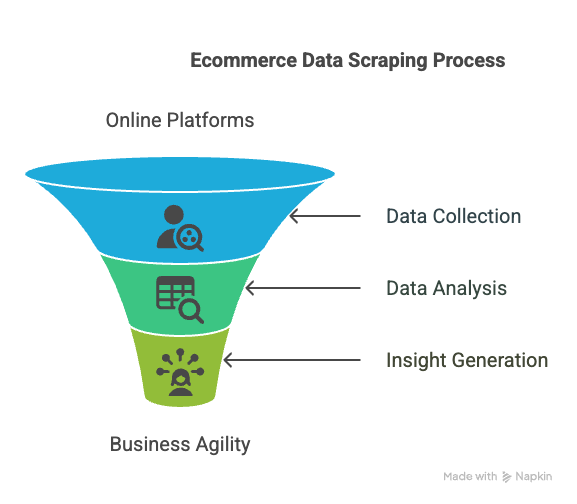
Ecommerce data scraping is the automated process of collecting data from online platforms. This includes product listings, pricing, reviews, and behavioral metrics. It’s not tedious manual research—scraping uses advanced tools to gather massive datasets efficiently.
Whether tracking competitor prices or analyzing customer sentiment, scraping keeps businesses agile. According to Forbes, data-driven companies are 19 times more likely to be profitable. With big data e commerce, scraping fuels strategies that drive growth and loyalty.
Why Ecommerce Data Scraping is a Game-Changer
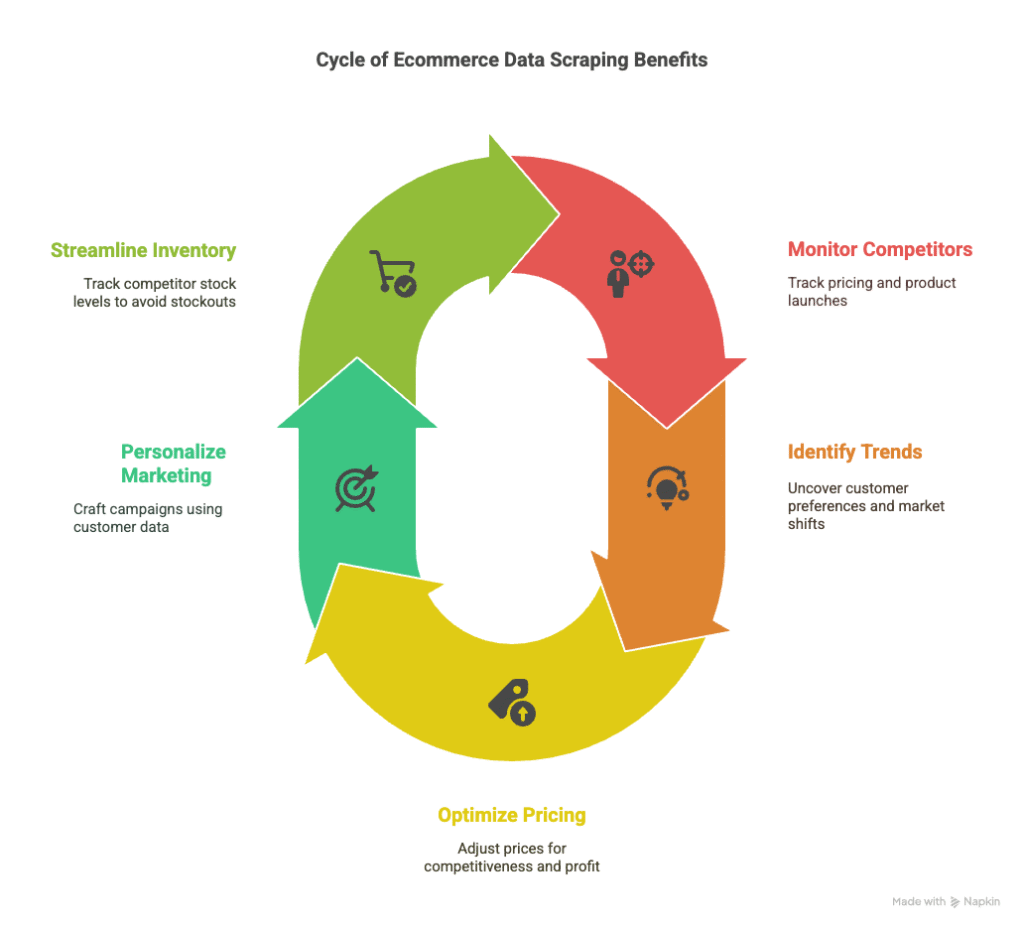
The ecommerce landscape is a battlefield with millions of stores vying for clicks. Here’s why ecommerce data scraping is non-negotiable:
- Outsmart Competitors: Monitor rivals’ pricing and product launches.
- Spot Trends Early: Uncover customer preferences and market shifts.
- Optimize Pricing: Fine-tune prices for competitiveness and profit.
- Hyper-Personalize Marketing: Craft campaigns using review and behavior data.
- Streamline Inventory: Avoid stockouts by tracking competitor stock levels.
Integrating scraped data into a database ecommerce system organizes insights for growth. Want to see it in action? Book a demo with Easy Data to explore our scraping solutions.
The Power of Big Data in Ecommerce
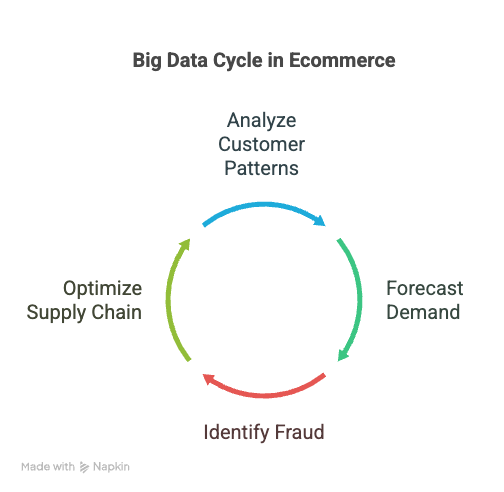
Big data e commerce is transforming how businesses operate. Every click, purchase, and review generates a flood of data. Ecommerce data scraping collects this wealth for processing with big data tools.
Key Benefits of Big Data in Ecommerce
- Understand Customers: Analyze browsing and buying patterns for personalization.
- Predict the Future: Forecast demand and optimize inventory with historical data.
- Stop Fraud: Identify suspicious patterns to protect your business.
- Optimize Supply Chain: Scrape supplier data to cut costs and boost efficiency.
A scalable database ecommerce system is essential to manage scraped data. Tools like MongoDB or PostgreSQL ensure insights are accessible and secure. Learn more about big data’s impact from McKinsey.
Real-World Applications
Consider an electronics retailer competing with Amazon. Scraping competitor sites for pricing helps them adjust dynamically. Big data analytics reveal trending products, optimizing stock. A database ecommerce system organizes this data for analysis, predicting sales spikes.
How Ecommerce Data Scraping Works
Ecommerce data scraping transforms raw web data into insights. Here’s how it works:
1. Targeting the Right Websites
Identify websites to scrape, such as:
- Competitor ecommerce stores
- Marketplaces like Amazon or eBay
- Review platforms like Trustpilot
- Social media for sentiment analysis
A fashion retailer might scrape competitors’ sites for product details and pricing.
2. Choosing the Best Scraping Tools
There’s a tool for every skill level:
- Web Scraping Libraries: Python’s BeautifulSoup, Scrapy, and Selenium for custom scripts.
- No-Code Platforms: Octoparse or ParseHub for non-technical users.
- APIs: Direct access to structured data from some websites.
Storing scraped data in a database ecommerce system ensures seamless analysis. Check out Scrapy’s documentation for advanced scraping tips.
3. Crafting Scraping Scripts
Custom scripts offer flexibility. Below is a Python script using BeautifulSoup to scrape product data: <xaiartifact artifact_id=”4d0c8b42-ea72-4556-8d76-d427581d9702″ artifact_version_id=”f8f47dc4-cbcd-42fd-b00b-3a69b00bd4ec” title=”Python Scraping Script” contenttype=”text/python”> import requests from bs4 import BeautifulSoup import pandas as pd <h1>Target website URL</h1> <p>url = “<a href=”https://example-ecommerce-site.com/products”>https://example-ecommerce-site.com/products</a>”</p> <h1>Send HTTP request</h1> <p>response = requests.get(url) soup = BeautifulSoup(response.text, ‘html.parser’)</p> <h1>Extract product names and prices</h1> <p>products = soup.find_all(‘div’, class_=’product-card’) data = []</p> <p>for product in products: name = product.find(‘h2′, class_=’product-name’).text.strip() price = product.find(‘span’, class_=’product-price’).text.strip() data.append({‘Product’: name, ‘Price’: price})</p> <h1>Save data to CSV</h1> <p>df = pd.DataFrame(data) df.to_csv(‘products.csv’, index=False) print(“Data scraped and saved to products.csv”)</p></xaiartifact>Show in sidebar
This script saves data to a CSV, ready for a database ecommerce system.
4. Storing Data Efficiently
Scraped data needs a structured home. A database ecommerce system like MySQL or MongoDB handles large datasets. A sample schema includes:
-
Table: Products
- Product_ID (Primary Key)
- Product_Name (Varchar)
- Price (Decimal)
- Category (Varchar)
- Competitor_URL (Varchar)
- Timestamp (Datetime)
This enables price tracking and competitor analysis.
5. Supercharging Analytics with GA4
Integrate scraped data with Google Analytics 4 (GA4) using the datalayer ecommerce GA4. This tracks user interactions like product views and purchases. Here’s a sample implementation:
javascriptCollapseWrapRunCopy
window.dataLayer = window.dataLayer || []; window.dataLayer.push({ 'event': 'view_item', 'ecommerce': { 'items': [{ 'item_name': 'Example Product', 'item_id': '12345', 'price': '29.99', 'item_category': 'Electronics', 'quantity': 1 }] } });Show in sidebar
This code enhances tracking with GA4. Learn more at Google’s GA4 guide.
Best Practices for Ethical Scraping
Scraping must be done responsibly. Follow these practices:
- Respect Terms: Check websites’ terms and robots.txt files.
- Avoid Overload: Use rate-limiting to protect servers.
- Use Proxies: Rotate IPs to avoid bans.
- Handle Dynamic Content: Use Selenium for JavaScript-heavy sites.
- Validate Data: Ensure accuracy and consistency.
Ethical scraping maximizes value while minimizing risks.
Integrating Scraped Data with Big Data Tools
To leverage big data e commerce, integrate scraped data with tools like Apache Spark or Snowflake. These process massive datasets for insights.
Sample Workflow
- Collect Data: Scrape with Scrapy.
- Store Data: Use MongoDB for unstructured data.
- Process Data: Clean with Spark.
- Analyze Data: Apply machine learning for predictions.
- Visualize Insights: Create dashboards in Tableau.
This turns raw data into strategic assets. See Tableau’s guide for visualization tips.
Case Study
A beauty retailer scraped competitor pricing and reviews. Stored in a PostgreSQL database ecommerce system, the data helped adjust prices and launch targeted ads. Sales rose 25% in three months.
Overcoming Scraping Challenges
Scraping has hurdles:
- Website Changes: Layout updates break scripts. AI-driven scrapers help.
- Anti-Scraping Measures: CAPTCHAs and bans require proxies.
- Data Quality: Cleaning processes ensure accuracy.
- Legal Risks: Comply with GDPR and CCPA.
Invest in tools and legal compliance to overcome these.
The Future of Ecommerce Data Scraping
By 2025, AI and machine learning will supercharge ecommerce data scraping. AI scrapers will adapt to website changes. ML will uncover deeper insights. The datalayer ecommerce GA4 will enable hyper-personalized marketing.
Explore more trends in our article on 2025 Ecommerce Trends.
Practical Applications
Businesses use scraping across industries:
- Retail: Scrape for competitive pricing.
- Marketplaces: Identify high-demand niches.
- Travel: Scrape airline deals.
- Electronics: Use reviews for product development.
- Food: Scrape promotions for price-matching.
These leverage big data e commerce for success.
Advanced Scraping Tools
Scale with these tools:
- Scrapy: For large-scale scraping.
- Selenium: For dynamic sites.
- Puppeteer: For single-page apps.
- Cloud Solutions: AWS ScrapingBee for managed scraping.
- AI Scrapers: Diffbot for automated extraction.
Combine with a database ecommerce system for efficiency.
Legal and Ethical Considerations
Navigate legalities carefully:
- Compliance: Adhere to GDPR and CCPA.
- Permission: Scrape only allowed sites.
- Privacy: Avoid sensitive data.
- Transparency: Use data responsibly.
Consult legal experts for compliance.
Take Your Strategy to the Next Level
Data is your greatest asset. Ecommerce data scraping empowers you to outsmart competitors and drive growth. With big data e commerce, database ecommerce systems, and datalayer ecommerce GA4, you can turn data into a powerhouse.
Don’t let competitors steal the spotlight. Book a demo with Easy Data to skyrocket your business in 2025.
Leave a Reply