
If you’ve ever tried to scrape data from ecommerce website platforms but got stuck at the word “coding”, you’re not alone.
For a long time, web scraping felt like something only developers could do, but that’s no longer true. Today, with the rise of no-code tools, you can scrape ecommerce data such as product data, prices, and reviews in just a few clicks (without writing a single line of code). And once you understand how this works, you’ll start to see why more businesses are building their entire data strategy around it.
Can You Scrape Data From Ecommerce Website Without Coding?
Yes, and in most cases, it’s much simpler than people expect. Instead of writing scripts or dealing with complex logic, modern tools let you interact with websites the same way you normally would. You click on a product name, a price, or a review, and the tool learns what to extract from the page.
What’s happening behind the scenes is still complex, but that complexity is hidden from you. That’s exactly what makes no-code tools to scrape data from ecommerce websites so powerful. It removes the technical barrier while still giving you access to the data that matters.
Why No-Code Ecommerce Scraping Is Growing
If you look at how teams work today, the shift toward no-code scraping isn’t surprising. In the past, collecting data meant relying heavily on developers. Every small request (whether it was tracking competitor prices or monitoring product listings) had to go through a technical team. That created delays, and more importantly, it slowed down decision-making.
No-code tools change that dynamic completely. Now, marketers, ecommerce managers, and analysts can scrape data from ecommerce website platforms on their own, test ideas quickly, and iterate without waiting weeks for implementation.
There’s also a cost factor. Building custom scraping systems requires time, infrastructure, and maintenance. With no-code tools, you can start small, validate your use case, and only scale when it makes sense.
But the biggest change isn’t technical, it’s operational: “Data is no longer something you request, it’s something you control”.
Best No-Code Tools To Scrape Data From Ecommerce Website
Once you decide to scrape data from ecommerce website sources without coding, the next question becomes: which tool should you use?
At first glance, many tools look similar. But in practice, each one is designed for a slightly different level of complexity. Choosing the right one early can save a lot of frustration later. Here’s a quick comparison to give you a clearer picture:
| Tool | Best For | Ease of Use | Scalability | Data Complexity | Ideal User |
|---|---|---|---|---|---|
| Octoparse | Quick scraping tasks | Very easy | Medium | Simple–Medium | Beginners |
| ParseHub | Dynamic websites (JS-heavy) | Medium | Medium | Medium–High | Intermediate users |
| WebHarvy | Small-scale scraping | Very easy | Low | Simple | Non-technical users |
| Import.io | Enterprise data pipelines | Medium | High | High | Data teams |
| Browse AI | No-code automation & monitoring | Very easy | Medium | Simple–Medium | Business users / SMBs |
| Diffbot | AI-powered structured extraction | Hard | Very high | Very high | Advanced users / AI teams |
Octoparse
Octoparse works almost like a guided experience. You load a page, click on the data you want, and the tool builds the workflow for you. For simple ecommerce pages, this is often enough to get usable data within minutes.
The trade-off is flexibility. Once you move into more complex site structures, you’ll start to feel its limits.
ParseHub
As your needs grow, you might notice that not all websites behave the same way. Some rely heavily on JavaScript, infinite scroll, or multi-step navigation. That’s where ParseHub becomes useful.
It’s still no-code, but it gives you more control over how the scraping process works. The downside is that it requires a bit more time to learn, especially if you’ve never worked with structured workflows before.
WebHarvy
WebHarvy automatically detects patterns on a webpage and extracts similar data points without much setup. For small projects or quick analysis, it works surprisingly well. But it’s not built for long-term or large-scale use. Once your requirements grow, you’ll likely need something more robust.
Import.io
At the other end of the spectrum, Import.io is designed for more structured, ongoing data workflows. Instead of just scraping data, it focuses on turning that data into something you can integrate into your business systems. That makes it suitable for companies that treat data as part of their operations, not just occasional analysis.
The trade-off, of course, is cost and setup complexity.
Browse AI
Browse AI is one of the newer-generation tools that makes no-code scraping feel even more accessible. Instead of building workflows manually, you “train” a bot by showing it what to extract. You interact with the page like a normal user, and the tool learns the pattern.
This makes it particularly useful for: monitoring product prices, tracking changes over time, and setting up recurring data collection.
This tool offers an intuitive experience, especially for non-technical users. However, that simplicity also means less control. For more complex scraping scenarios, you may find it harder to customize behavior compared to more advanced tools.
Diffbot
Diffbot uses AI to automatically understand the structure of a webpage and extract data accordingly. In theory, this removes much of the manual setup required in other tools. For large-scale or multi-site scraping, this can be extremely powerful, but there’s a catch: it’s not as “plug-and-play” as beginner tools.
To use Diffbot effectively, you need to understand how its extraction models work and how to structure your data pipeline. It’s closer to an AI-powered data solution than a simple scraping tool.
Step-by-Step: How To Scrape Data From Ecommerce Website Without Coding
At this stage, things start to feel much more real. Instead of thinking in terms of tools or theory, what matters now is how you actually go from a product page, … to a usable dataset. The good news is that once you understand the flow, the process to scrape data from ecommerce website platforms becomes surprisingly consistent.
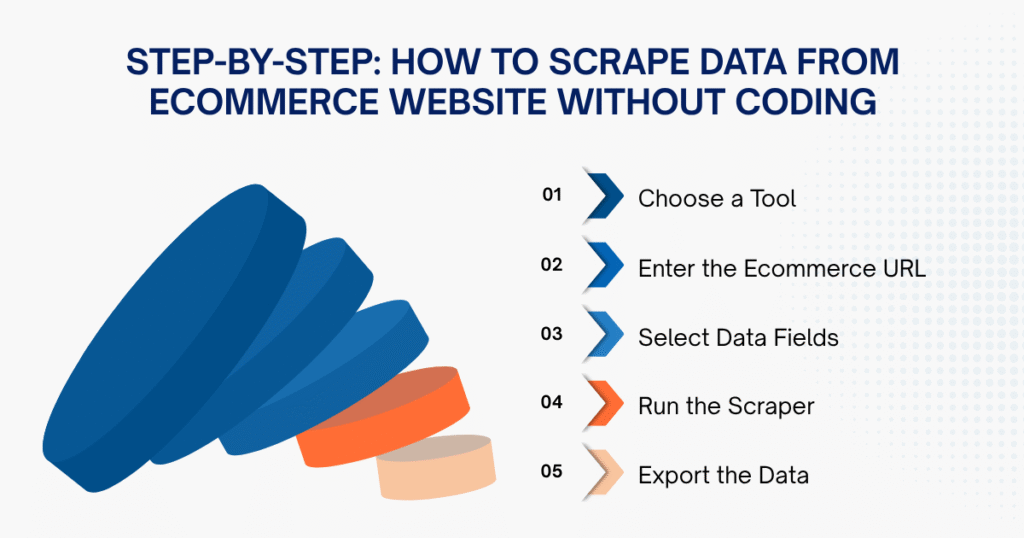
Step 1: Choose a Tool
The first step is simply picking a tool that you feel comfortable using.
- Sign up for a no-code tool like Octoparse or Browse AI
- Open the tool’s built-in browser
- Start a new scraping project
At this point, many beginners fall into the trap of over-researching tools. In reality, the differences between tools only become meaningful later, when your use case gets more complex. Right now, what matters most is scraping your first dataset from ecommerce websites as quickly as possible.
A little tip we want to give teams: if the interface feels intuitive within the first 10 minutes, it’s good enough to start.
Step 2: Enter the Ecommerce URL
Once inside the tool, the next step is choosing the right page to scrape.
- Copy a URL from an ecommerce site
- Paste it into the tool
- Let the page load fully
Not all pages are equally good for scraping: structured pages with clear, repeating product lists (like category or search results) work best, while homepages or personalized layouts are inconsistent and unreliable.
A shortcut: if you can see a repeating list of similar products, you’re likely on the right page to scrape.
Step 3: Select Data Fields
This is usually the moment when everything starts to click.
- Click on a product name
- Click on a price
- Click on ratings or reviews
- Let the tool auto-detect similar elements
Instead of writing logic, you’re essentially “teaching” the tool by example. Once you select one product name, the tool looks for patterns and applies that logic across the entire page.
What many people don’t realize is that accuracy at this step determines the quality of your entire dataset. If you click inconsistently (choosing slightly different elements across products), the tool may extract messy or misaligned data. A clean selection upfront saves a lot of cleanup later.
Step 4: Run the Scraper
After defining your data fields, the tool is ready to start collecting data.
- Click “Run” or “Start”
- Choose local or cloud execution (if available)
- Let the scraper process the page
When running a tool, you must properly configure pagination and auto-scroll; you’ll unknowingly capture only a small portion of the available data, even though the tool itself is working correctly.
Step 5: Export the Data
Once the scraping run is complete, you’ll export the data into a usable format.
- Export to CSV, Excel, or Google Sheets
- Open the file
- Review the output
At this stage, don’t expect perfection. Even with a good setup, scraped data usually needs quick cleanup: removing duplicates, fixing formatting, and checking missing values. That’s normal, and as you gain experience with the tools, you’ll need less cleanup.
What Data Can You Scrape Without Coding?
Once you begin to scrape data from ecommerce website with these tools, you’ll quickly realize how much data is actually accessible, specifically the following:
- Product information (name, category, description)
- Pricing data (price, discounts)
- Customer signals (reviews, ratings)
- Seller information
- Listing and ranking data
Individually, each dataset is useful. But the real value appears when you combine them, when pricing, reviews, and ranking start telling a story about how the market is moving.
Important Considerations When Using No-Code Scraping Tools
No-code tools are extremely useful when you first learn to scrape data from ecommerce website pages, but the longer you use them, you’ll start to notice.
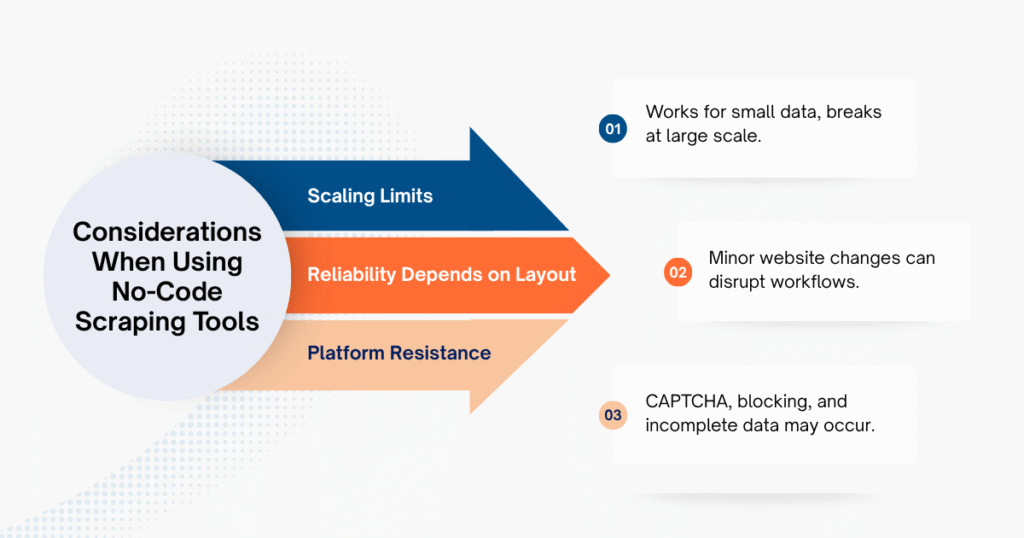
- Scale becomes a bottleneck sooner than expected: What feels fast and smooth when scraping a few hundred pages can quickly turn unstable as you expand. Tasks take longer, workflows break more often, and managing large datasets becomes increasingly difficult.
- Reliability depends heavily on website stability: Ecommerce platforms change frequently, sometimes in small ways that are easy to miss. Even minor layout updates can disrupt your scraping setup, forcing you to constantly adjust and maintain workflows.
- Platform resistance is part of the game: Many ecommerce sites actively detect automated behavior. As you scrape data from ecommerce website sources more frequently, you may encounter blocked requests, CAPTCHAs, or incomplete data extraction.
These aren’t deal-breakers, but they are important to understand early, so you don’t rely on tools in situations they weren’t designed for.
When No-Code Scraping Tools Are Not Enough
For many teams, no-code tools are the perfect starting point, but over time, requirements change. You might need real-time updates instead of periodic scraping, or you may want to track multiple marketplaces at once. Sometimes your dataset simply grows to a point where manual workflows become inefficient. At that stage, relying solely on tools that scrape data from e-commerce websites can create more friction than value.
That’s usually when teams start exploring more advanced approaches. Some move toward custom solutions, attempting to scrape e-commerce websites using Python and automation frameworks. Others take a different path, focusing less on how to collect data and more on how to use it effectively by hiring third-party providers that offer custom web scraping services.
Ecommerce Data Scraping Services
If you’re no longer trying to figure out how to scrape data from ecommerce website platforms, but instead asking how to make that data reliable and usable at scale, then a managed scraping service becomes the logical next step.
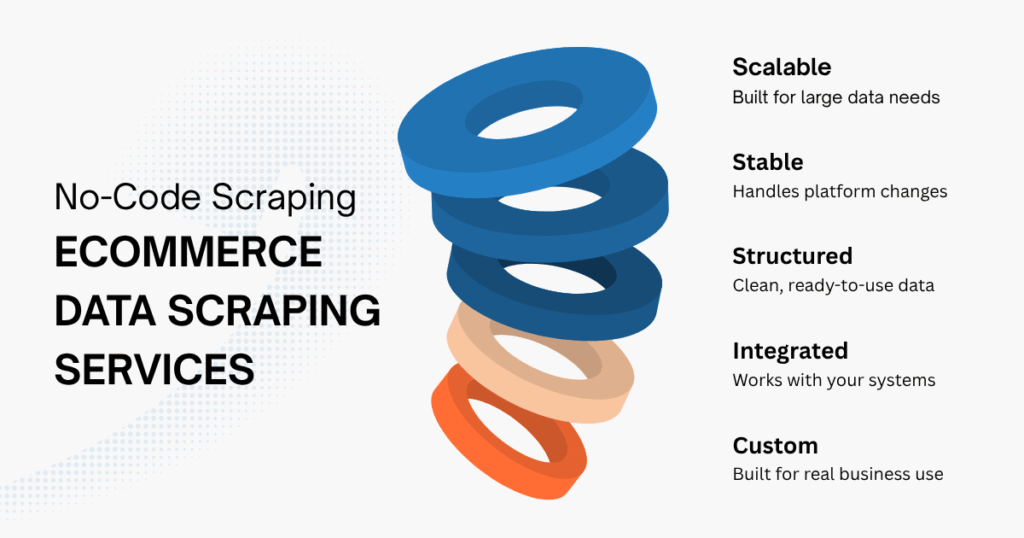
In Southeast Asia, platforms like Shopee, TikTok Shop, and Lazada change constantly. Layout updates, anti-bot systems, and dynamic content can break most tool-based setups without warning. With a managed service, these issues are handled continuously in the background, so your data flow remains stable without constant maintenance.
Another key advantage is how the data is delivered. Instead of exporting files manually, you get structured datasets that update in real time or on a schedule, ready to plug directly into pricing systems, dashboards, or internal analytics workflows. This removes a significant amount of operational friction.
More importantly, the data is not generic. It’s tailored to actual business use cases, whether that’s tracking competitor pricing on Shopee, monitoring product performance on TikTok Shop, or analyzing category trends on Lazada.
Solutions like Lazada, TikTok Shop, and Shopee data scraping services from Easy Data are built around how each platform behaves, not just how to extract data from it. Instead of spending time figuring out how to scrape data from ecommerce website sources, your team works directly with clean, structured, and reliable data. And in a market that moves this fast, that difference shows up immediately: not in how much data you collect, but in how quickly you can act on it.
Conclusion
Learning how to scrape data from ecommerce website platforms without coding is one of the easiest ways to get started with data-driven decision-making. It lowers the barrier, speeds up execution, and gives teams direct access to insights they used to depend on others for. But like most tools, it has its place. The real advantage comes from knowing when to use it and when to move beyond it.
Leave a Reply