


Introduction: Upwork Job Data and Access Limits
Upwork job information can help freelancers assess project fit and help businesses plan hiring. However, web scraping Upwork is not an unrestricted data-collection method. Upwork’s automation policy restricts unapproved bots and scraping; an API key does not authorize scraping its public or private website data. This guide explains how to assess an approved data route and interpret job information without confusing advertised budgets with earnings. Access guidance reviewed October 3, 2026.
What Does Web Scraping Upwork Mean?
The phrase web scraping Upwork usually describes software extracting information from its web pages. An approved API integration is a different access route. Before designing a job-data workflow, establish which records, fields and uses are actually available to your account. A visible listing does not establish permission to collect a marketplace-wide dataset.
A useful analysis starts with a narrow question: which skills occur in the permitted sample, how do advertised hourly ranges vary within a category, or which projects fit a defined delivery budget? Results describe that sample and observation period. They do not automatically measure the entire freelance market, accepted contract prices or freelancer income. For a related recruitment example, see our LinkedIn job-data analysis guide on duplicate listings and missing salary information.
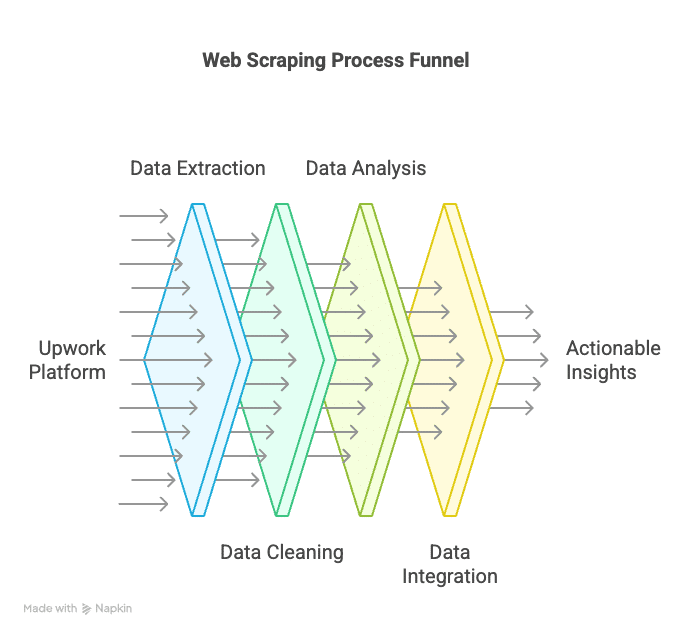
What Authorized Job Data Can Help You Assess
-
Repeatable collection within an approved scope
A consistent import can reduce repeated formatting work. Record when each observation was obtained and any collection gaps. Do not describe a batch export or periodic API response as a real-time view of all jobs. -
Project and budget comparison
Compare the requested deliverables and advertised price for similar work. A client’s proposed budget, a freelancer’s profile rate and an agreed contract payment are different measures. Job advertisements alone cannot reveal competitors’ realized revenue. -
Skill and category analysis
Count unique listings that mention a skill within a stated sample. Track changes only when the source, filters and time windows are comparable. Reposts, changed search coverage and incomplete records can otherwise look like growth in demand. -
Hiring preparation
Use recurring requirements to improve a project brief and interview questions. Keep candidate evaluation within the platform’s permitted hiring workflow; a collected profile is not consent to unsolicited outreach or evidence of suitability. -
Measured time savings
Compare the full cost of setup, quality checks, maintenance and review with the manual workflow. Automation may help with a repeated task, but small or irregular projects can cost more to automate than to assess directly.
How to Plan an Authorized Job-Data Workflow
Use the following sequence to evaluate access, define a comparable sample and check the resulting analysis. If the proposed access or reuse is not approved, stop at the planning stage and choose a source whose terms support the project.
1. Confirm Access Before Choosing a Tool
Start with Upwork’s developer documentation and the permissions granted to the proposed integration. Its API offerings cover areas such as jobs, contracts and reporting, but that overview is not a guarantee that a particular application can retrieve every field or the whole marketplace. Choose a tool only after confirming the access route:
- Approved API integration: Verify the approved use case, endpoint permissions and response schema before development. An API approval is not a substitute for checking what the specific project may do.
- Licensed or supplied data: If using a separate provider or a client-supplied file, verify provenance and rights for analysis, retention and sharing. A vendor’s “Upwork scraper” label is not evidence of authorization.
- Local analysis tools: A spreadsheet or Python script can validate an authorized file, normalize categories and calculate summaries. This processing step does not itself grant access to the original platform.
- Website scraping tools: ParseHub, Scrapy, BeautifulSoup and Octoparse were previously listed here as collection options. They do not confer Upwork permission. Do not treat this list as an endorsed route to collect Upwork pages.
2. Define the Data You Need
Create a field list for the approved source before writing an importer. These are analysis requirements to check, not a promise that Upwork exposes them to every application:
- A stable record identifier, observation timestamp and source reference for deduplication and traceability.
- Project category and requested skills, using a documented mapping when labels vary.
- Contract type, currency and separate fields for advertised hourly lower/upper bounds or a fixed project budget.
- Posting date and project status when available and permitted; otherwise label the period and status as unknown.
Keep missing fields empty and report their frequency. A missing budget is not zero. Avoid collecting client or freelancer names, contact details and profile text when category-level analysis can answer the question without them.
3. Set Scope, Refresh and Retention Rules
Write down the permitted scope and retention rules alongside the processing schedule. Upwork’s API limits documentation currently specifies up to 10 requests per second per IP address, HTTP 429 responses above that limit, and a maximum 24-hour cache period for API responses. The limit applies across applications sharing an IP; it is not a target throughput or permission to build a permanent raw-data archive.
- Sample definition: categories, language, time window and inclusion rules. Describe excluded records so another analyst can interpret the denominator.
- Collection and retention: refresh only as approved, record failures and define deletion or expiry handling. Check whether the intended historical analysis is compatible with the source’s terms before storing snapshots.
- Output contract: documented columns, currency units, time zone, missing-value representation and delivery format such as CSV or JSON. See our dataset validation guide for checks to agree before delivery.
4. Validate a Small Approved Sample
Run a small approved sample first. Check the returned field definitions, pagination, timestamps and null values against the expected schema. Record failed requests separately from empty results, and stop on permission failures. Handle rate-limit responses with bounded retries under the applicable API guidance. A completed request proves delivery of a response, not complete coverage of every job.
5. Analyze the Data
Use a spreadsheet or analysis script to deduplicate records and separate hourly from fixed-price projects. Record the number of usable observations behind each chart. Compare like-for-like categories, currencies and observation windows; changes in filters or missing-data rates can change an apparent trend. The fictional example below demonstrates the calculations without using collected Upwork records.
Fictional example: four unique projects, not a salary survey. Assume a permitted file contains five rows: hourly project A appears twice, and projects B, C and D appear once. Removing A’s repeated row leaves four unique projects. The values below are invented solely to explain the method.
| Project | Advertised terms | Interpretation |
|---|---|---|
| A | Hourly: USD 20–30 | One unique listing, despite two input rows. |
| B | Hourly: USD 30–50 | Another advertised range, not a paid rate. |
| C | Fixed: USD 400 | Total proposed project budget; hours unknown. |
| D | Fixed: budget missing | Count the project; exclude it from budget calculations. |
The two hourly listings have average lower bounds of (20 + 30) / 2 = USD 25 and average upper bounds of (30 + 50) / 2 = USD 40. These summarize advertised bounds for two listings; they are not an average paid wage. Only one of the two fixed-price projects has a usable budget. Report that missingness instead of inserting zero.
For project C, assuming 20 hours would imply USD 400 / 20 = USD 20 per hour before costs; assuming 40 hours would imply USD 10. Neither estimate is observed earnings because the hours and final payment are unknown. Keep fixed budgets separate from hourly ranges, and disclose any workload assumption when evaluating a quote.
Permission, Crawler Rules and Personal Data
Treat access approval, data interpretation and personal-data handling as separate checks. Passing one does not settle the others:
- Platform permission: Follow the approved use case. Upwork’s policy identifies page scraping and unapproved automation as restricted even when a user has an API key; violations can lead to account or API restrictions.
- Crawler instructions: RFC 9309 distinguishes robots.txt instructions from access authorization. A permissive robots rule does not replace platform permission or data-use rights.
- Personal data: Minimize identifying fields, restrict who can access the output, and define deletion and sharing rules. Review applicable privacy obligations before using personal information; a public profile or a business research purpose does not by itself settle that review.
Conclusion: Build on Verifiable Access and Evidence
Useful job-market research depends on an approved source, a defined sample and honest interpretation. For Upwork, resolve access and retention before promising an automated dataset. Then distinguish listing budgets from agreed prices, deduplicate records and document what the sample cannot answer. Neither a larger row count nor an attractive chart proves a hiring advantage or higher earnings.
For help scoping a project around an authorized source, review our data collection services. Include the source permission, required fields, expected delivery and acceptance criteria in your brief. Our freelance project brief and budget example can help you evaluate a contractor’s proposal.
Further reading
Leave a Reply