
Introduction: What are Web Scraping Libraries?
A web scraping library supplies reusable code for part of a data-collection workflow. Distinguish HTTP clients that fetch responses, parsers that extract fields from documents, crawling frameworks that coordinate requests, and browser automation that runs page JavaScript. A single package does not necessarily provide all four.
- Introduction: What are Web Scraping Libraries?
- 1. Web Scraping Libraries for Python
- 2. Web Scraping Libraries for JavaScript
- 3. Web Scraping Libraries for Other Languages
- 4. Choosing the Right Web Scraping Library
- 5. Legal & Ethical Considerations for Web Scraping
- Final Thoughts: Choose by Capability and Maintenance
Why Use a Web Scraping Library?
✔ Reuse document parsing or browser interaction code
✔ Choose the layer your source actually requires
✔ Plan scheduling, retries, storage and validation separately
✔ Check language support, maintenance and deployment requirements before adoption. CAPTCHA solving and proxy rotation are not universal built-in features.
This guide compares options for Python, JavaScript and other languages. Documentation checked October 2, 2026: the original 2025 title is retained, but maintenance notes below reflect this later review. These are use-case comparisons, not measured performance rankings.
1. Web Scraping Libraries for Python
Python offers separate tools for fetching responses, parsing HTML and controlling browsers. Start by checking whether your required fields exist in an authorized API response, the original HTML, or only after browser interaction.
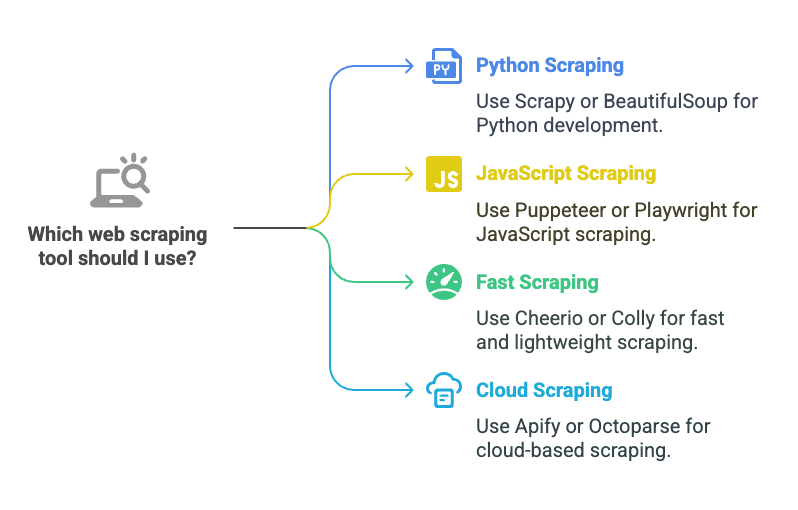
Comparison note: the table below separates supported Python tools from the unofficial Pyppeteer port. Select by required capability and maintenance status, not the number of features in an illustration.
| Python option | Role | Important limit |
|---|---|---|
| Scrapy | Crawl framework | Configure source limits and pipelines |
| Beautiful Soup | HTML/XML parser | Needs supplied markup; no JS execution |
| Selenium | Browser automation | Requires browser setup and data-ready waits |
| Playwright | Browser automation | Requires browser binaries; no guaranteed access |
| Pyppeteer | Unofficial Python port | Repository says unmaintained; assess alternatives |
📖 Further reading: Requests HTTP client documentation. If you prefer a visual interface, compare the distinct options in our free scraping software guide.
1. Scrapy – Coordinating Multi-Page Crawls
📌 Website: Scrapy
📌 Useful for: Coordinating multi-page crawls, extraction and export pipelines.
Key features: spiders, concurrent requests and configurable downloader middleware. AutoThrottle adjusts request delays when enabled. Proxy support does not supply a rotating proxy pool; rotation requires configuration or additional code/services. Throughput depends on source limits and your workload.
📖 Learn more: Scrapy downloader middleware.
2. Beautiful Soup – Parsing Supplied Markup
📌 Website: Beautiful Soup documentation
📌 Useful for: Navigating and extracting fields from supplied HTML or XML.
Key features: tree navigation, searches and CSS selectors. Beautiful Soup does not fetch pages or execute JavaScript itself. Supply HTML from an HTTP client or a browser as appropriate. Its API is not an XPath API; if XPath is required, consider lxml XPath support directly.
Validation tip: test selectors against saved documents with missing fields, repeated cards and changed layouts. Preserve a missing price as missing rather than silently converting it to zero.
3. Selenium – Browser Interaction
📌 Website: Selenium
📌 Useful for: Driving real browser interactions when the required content depends on them.
Key features: WebDriver controls browsers such as Chrome, Firefox and Edge. It can interact with page controls and inspect rendered content. Wait for the required element or application state; a completed navigation alone does not establish that every asynchronous result is ready.
📖 Learn more: Official Selenium WebDriver documentation.
4. Playwright – Browser Automation
📌 Website: Playwright for Python
📌 Useful for: Browser workflows using Chromium, Firefox or WebKit.
Key features: browser contexts, locators and actionability checks for supported actions. Automatic waiting helps interactions; extraction still needs a condition for the specific data you expect. Playwright does not guarantee access through anti-bot controls or provide permission to bypass them.
Deployment check: account for the browser binaries and runtime dependencies as well as the language package. Verify the same supported browser/version in your development and deployment environments.
5. Pyppeteer – Maintenance and Puppeteer Differences
Puppeteer and Pyppeteer are different projects. Puppeteer is a JavaScript library for automating Chrome and Firefox. Pyppeteer is an unofficial Python port focused on Chrome/Chromium; its repository currently identifies it as unmaintained.
For a new Python browser project, evaluate the maintained Python options above and confirm compatibility with your requirements. Existing Pyppeteer code needs a migration assessment; Puppeteer documentation is not proof that the Python port supports the same APIs or browser versions.
📖 Learn more: Pyppeteer maintenance notice and Puppeteer documentation.
2. Web Scraping Libraries for JavaScript
JavaScript tools also operate at different layers. A parser can inspect supplied markup without running the page; browser automation can execute page scripts; an HTTP client requests data but does not render a DOM.
| JavaScript option | Role | Important limit |
|---|---|---|
| Puppeteer | Chrome/Firefox automation | Check supported browser features |
| Playwright | Browser automation | Check engine and runtime requirements |
| Cheerio | Markup parser | Does not execute scripts |
| Axios or fetch | HTTP requests | No page rendering or extraction model by itself |
📖 Further reading: Cheerio capabilities and limits. Cheerio does not load external resources or execute page JavaScript.
3. Web Scraping Libraries for Other Languages
| Language | Option | Role or caveat |
|---|---|---|
| PHP | Goutte / Symfony HttpBrowser | Goutte is deprecated; follow its migration guidance |
| Ruby | Nokogiri | HTML/XML parser |
| C# | Html Agility Pack | HTML parser with XPath support |
| Go | Colly | Collection framework; configure workload limits |
Maintenance note: Goutte is deprecated; its maintainers direct users to Symfony BrowserKit’s HttpBrowser. Verify the replacement’s dependencies and behavior before migrating an existing collector.
4. Choosing the Right Web Scraping Library
| Observed requirement | Starting point to evaluate |
|---|---|
| Required fields already in HTML | HTTP client + Beautiful Soup, lxml or Cheerio |
| Many linked pages to coordinate | Scrapy or another crawl framework |
| Fields require browser interaction | Selenium, Playwright or Puppeteer in its supported language |
| Authorized API provides fields | HTTP client such as Requests or Axios |
| Existing unsupported dependency | Test a migration before extending the collector |
Worked selection example (fictional, not a benchmark): suppose you inspect 10 authorized product-page examples. Eight include the required name and price in their original HTML; two reveal those fields only after a permitted browser interaction. Start with an HTTP client plus parser for the eight, and test browser automation for the two. The 8/10 split (80%) describes this invented sample, not an expected speed gain or all sites.
Before scheduling a larger run, record the chosen library/version, required fields, sample URLs, expected record count and observed errors. Check duplicate IDs, missing values, pagination, currencies and timestamps against saved examples. Measure runtime and memory under the same workload before claiming one stack is faster. Our scraping applications guide explains how collection coverage limits the business conclusions you can draw.
5. Legal & Ethical Considerations for Web Scraping
Technical capability does not establish permission to collect or reuse data. Review the source’s access terms, purpose and applicable obligations before choosing a collection method.
✔ Prefer a permitted API or export when it meets the task
✔ Respect robots directives, access controls and source-specific request limits
✔ Use conservative concurrency and backoff; stop and review denied access
✔ Minimize personal data and define retention and reuse rules. Proxies or anonymous requests do not create authorization.
📖 Protocol reference: RFC 9309 explicitly distinguishes robots rules from access authorization. Check applicable terms and law separately; a robots allowance is not a legal clearance.
Final Thoughts: Choose by Capability and Maintenance
Choose the smallest stack that supplies the required layer: an HTTP client and parser for suitable documents, a crawling framework for coordinated collection, or browser automation when rendering or interaction is necessary. Hosted platforms such as Apify and Octoparse are a separate product category; evaluate their plan limits and operating model rather than treating them as interchangeable language libraries.
📩 Need professional web scraping solutions? Contact Easy Data for custom data extraction services.
Leave a Reply