

Introduction
The process of web scraping has become an essential tool for businesses looking to extract valuable data from websites automatically. In the competitive world of eCommerce, having access to real-time insights—such as competitor pricing, customer reviews, and trending products—can give businesses a crucial advantage.
At its core, web scraping involves using automated scripts or tools to collect publicly available information from web pages. This process allows businesses to make data-driven decisions, optimize pricing strategies, monitor inventory levels, and analyze customer sentiment—all without manual effort.
But how does web scraping actually work? What steps are involved in extracting and utilizing web data efficiently?
In this guide, we’ll break down the step-by-step process of web scraping, explore its importance for eCommerce businesses, and show how Easy Data provides scalable, automated solutions for seamless data extraction. Whether you’re an eCommerce enabler, a market researcher, or a data analyst, this article will help you understand how to leverage web scraping for maximum business impact.
Let’s dive into the 7-step process of web scraping and see how you can extract valuable insights effortlessly.
-
Introduction
- What is the Process of Web Scraping?
- Why Web Scraping is Essential for eCommerce?
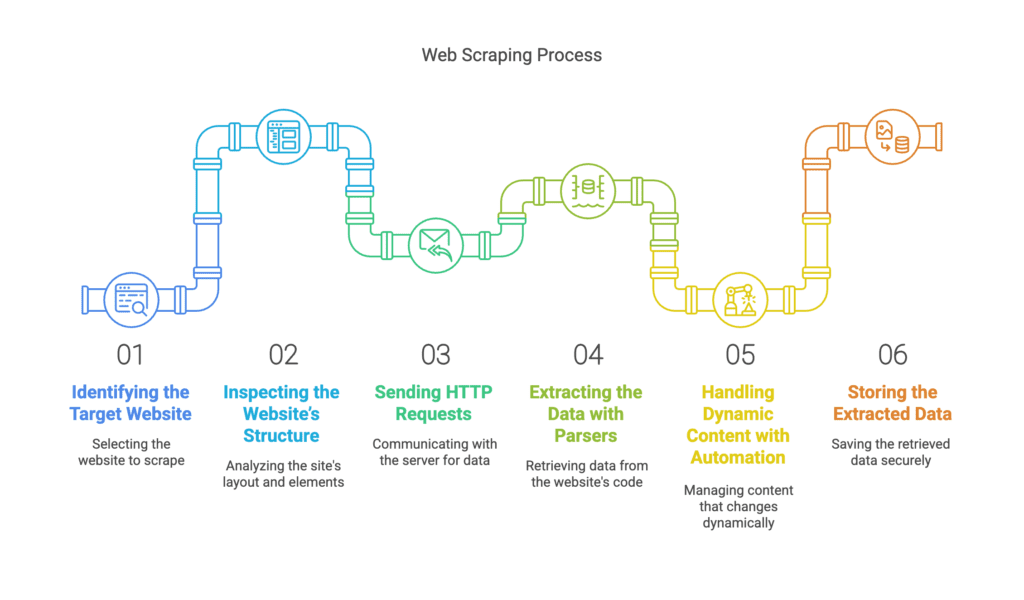
- Step-by-Step Process of Web Scraping
- Step 1: Identifying the Target Website
- Step 2: Inspecting the Website’s Structure
- Step 3: Sending HTTP Requests
- Step 4: Extracting the Data with Parsers
- Step 5: Handling Dynamic Content with Automation
- Step 6: Storing the Extracted Data
- Step 7: Analyzing & Utilizing the Data
- How Easy Data Simplifies the Web Scraping Process
- Why Choose Easy Data?
- Legal & Ethical Considerations for Web Scraping
- Final Thoughts: The Power of Web Scraping for eCommerce
What is the Process of Web Scraping?
The process of web scraping involves extracting publicly available data from websites using automation. Businesses, especially in eCommerce, use web scraping for price tracking, competitor analysis, and market research to stay ahead.
At Easy Data, we help businesses automate data collection so they can focus on analyzing insights instead of manual extraction.
In this guide, we’ll break down the step-by-step process of web scraping, explain why it matters, and show how Easy Data makes web scraping easy for eCommerce enablers.
Why Web Scraping is Essential for eCommerce?
Businesses in eCommerce need real-time insights to make data-driven decisions. Here’s how web scraping helps:
✅ Competitive Pricing: Track competitor prices dynamically.
✅ Product Listings: Monitor inventory changes across platforms.
✅ Customer Sentiment: Analyze reviews to enhance product quality.
✅ Market Trends: Identify best-selling products before competitors.
With automated data extraction, companies save time, boost efficiency, and gain an edge in the digital marketplace.
Step-by-Step Process of Web Scraping
Step 1: Identifying the Target Website
Before starting, businesses must choose a web scraping example website that contains the needed data.
For eCommerce, common targets include:
- Amazon (www.amazon.com) – Product prices, reviews, and stock availability.
- eBay (www.ebay.com) – Auction insights and seller data.
- Google Shopping (www.google.com/shopping) – Multi-store price comparisons.
💡 Pro Tip: Check the website’s robots.txt file to ensure scraping is allowed and follow ethical scraping practices.
Step 2: Inspecting the Website’s Structure
After selecting a target website, analyze its HTML structure using developer tools in Chrome or Firefox.
Look for:
✔ Product names & prices inside <div> or <span> tags
✔ Customer reviews stored in lists (<ul> or <li>)
✔ Pagination elements to scrape multiple pages
💡 Pro Tip: Right-click > Inspect Element (in Chrome) to check the exact location of the data you need.
Step 3: Sending HTTP Requests
To extract data, a scraper sends an HTTP request to the website’s server.
Common request methods:
- GET: Retrieves webpage data (used in most scraping tasks).
- POST: Submits form data (e.g., logging in to access private content).
Popular Libraries for HTTP Requests:
📌 Python: requests
📌 Node.js: axios
📌 JavaScript: fetch()
💡 Pro Tip: Use headers and user agents to mimic human browsing and avoid detection.
Step 4: Extracting the Data with Parsers
Once the raw HTML data is received, parsing libraries extract the required information.
Best Tools for Parsing Data:
✔ BeautifulSoup (Python) – Extracts elements from HTML/XML.
✔ Scrapy (Python) – Full web scraping framework.
✔ Cheerio (Node.js) – Lightweight parser for JavaScript scrapers.
💡 Pro Tip: Use XPath or CSS Selectors to locate data quickly.
Step 5: Handling Dynamic Content with Automation
Some websites use JavaScript-rendered content that standard scrapers can’t fetch.
✅ Solution: Use a headless browser like Selenium or Puppeteer to interact with the site.
Example: Scraping dynamically loaded product prices from Amazon using Selenium.
💡 Pro Tip: Set delays & proxies to prevent detection while scraping JavaScript-heavy sites.
Step 6: Storing the Extracted Data
After extracting data, businesses need to store it in a structured format.
Common Storage Methods:
✔ CSV/Excel – Simple and easy to analyze.
✔ Databases (MySQL, MongoDB, PostgreSQL) – For large-scale storage.
✔ Cloud storage (Google Sheets, AWS, Firebase) – For real-time updates.
💡 Pro Tip: Use automated pipelines to scrape and store data without manual effort.
Step 7: Analyzing & Utilizing the Data
Now that the scraped data is stored, it’s time to analyze it for business insights.
✅ Competitive Pricing: Track competitor prices dynamically.
✅ Product Listings: Monitor inventory changes across platforms.
✅ Customer Sentiment: Analyze reviews to enhance product quality.
✅ Market Trends: Identify best-selling products before competitors.
💡 Pro Tip: Use data visualization tools like Tableau, Power BI, or Python Pandas for better insights.
How Easy Data Simplifies the Web Scraping Process
Manually handling the process of web scraping can be time-consuming and complex. That’s where Easy Data helps.
Why Choose Easy Data?
🚀 Automated Web Scraping – No need for coding or manual data extraction.
📊 Real-Time Data Feeds – Get live price tracking and inventory updates.
🔄 Custom Scraping Solutions – Tailored for eCommerce, finance, and marketing.
💾 Structured & Ready-to-Use Data – Get data in CSV, JSON, or API format.
Instead of building a scraper from scratch, businesses can rely on Easy Data’s advanced web scraping solutions for fast, scalable, and reliable data extraction.
✅ Get started with Easy Data today → Visit Easy Data
Legal & Ethical Considerations for Web Scraping
Before scraping any website, businesses must respect legal guidelines:
❌ Avoid scraping private data (login-protected content).
✔ Check robots.txt to follow site scraping policies.
✔ Use official APIs when available.
💡 Pro Tip: Some websites, like Amazon and eBay, provide official APIs that serve as legal alternatives to scraping.
Final Thoughts: The Power of Web Scraping for eCommerce
The process of web scraping enables businesses to collect, analyze, and act on eCommerce data efficiently. Whether tracking competitor prices, analyzing customer sentiment, or monitoring inventory, data-driven decisions give businesses an edge.
Instead of building and maintaining scrapers, let Easy Data handle the complexity for you.
📩 Need web scraping solutions? Contact Easy Data today!
Leave a Reply