

Introduction: Why Web Scraping Online Jobs is Important for Recruitment
The process of manually collecting job listings from online platforms can be time-consuming and inefficient. With the growth of online job boards and job aggregators, web scraping online jobs has become a powerful tool for automating the collection of job listings. By using automated web scraping tools, businesses and recruitment agencies can efficiently gather job data, analyze market trends, and streamline their recruitment strategies. In this article, we will explore how web scraping online jobs can help businesses optimize their recruitment process and gain valuable insights from the job market.
- Introduction: Why Web Scraping Online Jobs is Important for Recruitment
- What is Web Scraping Online Jobs?
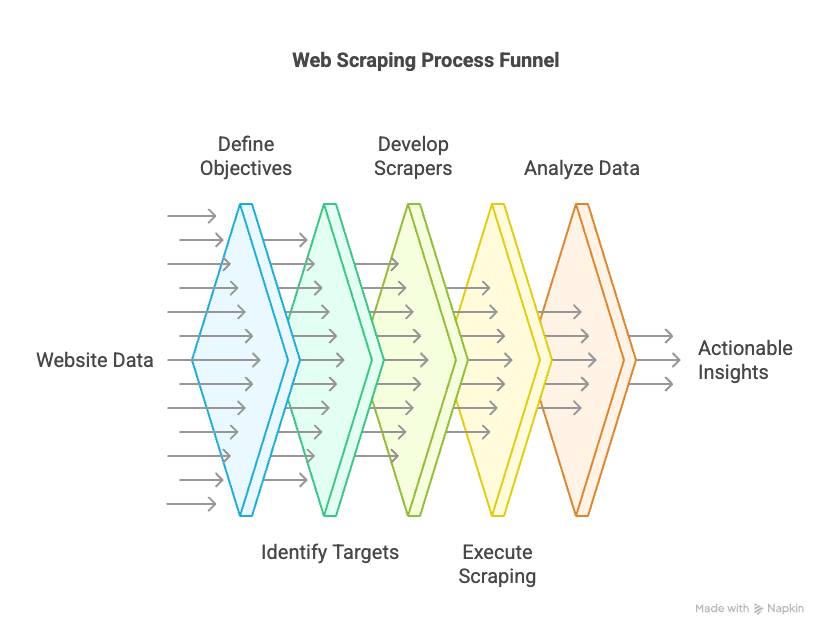
- Key Benefits of Web Scraping Online Jobs
- How to Scrape Online Job Listings Effectively
- Legal and Ethical Considerations in Web Scraping Online Jobs
- Conclusion: Optimizing Recruitment with Web Scraping Online Jobs
What is Web Scraping Online Jobs?
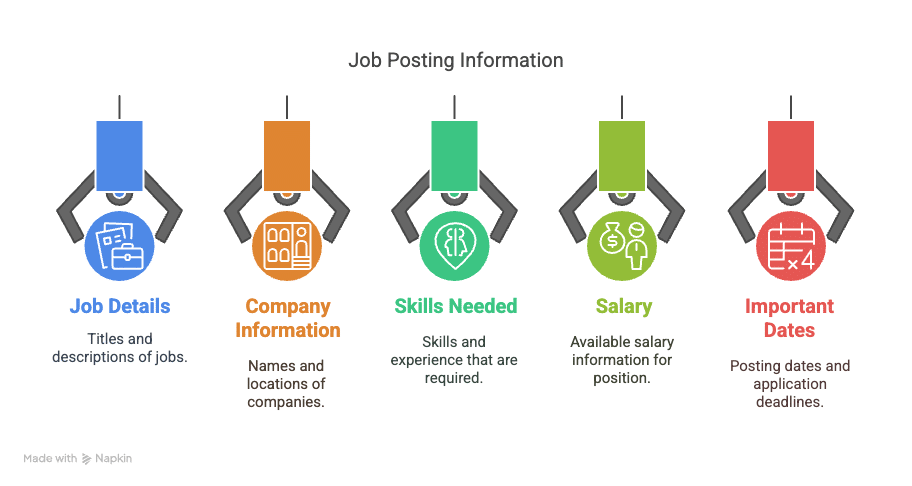
Web scraping online jobs refers to the process of using automated tools to extract job listings and related information from job boards, recruitment platforms, and company career pages. This data can include job titles, descriptions, company names, required skills, salary ranges, and location information. By scraping job listings from multiple sources, businesses and recruiters can create centralized databases of job opportunities and analyze trends in the job market.
Automation can make collection repeatable, but freshness depends on successful refreshes and the source’s own updates. Keep the observation time separate from the date a job was posted. A listing that remains online is not proof that the role is still open, and a failed request is not proof that it has closed.
Key Benefits of Web Scraping Online Jobs
-
Automated Job Data Collection
A scheduled workflow can collect permitted job listings across a defined set of sources. Record which pages succeeded, which failed and when each record was observed. Keep stale or unverified records visibly labelled instead of presenting every saved posting as a current opportunity. -
Recruitment Research
Aggregated listings can help teams examine advertised roles and required skills within the sources they cover. This is market research, not a candidate assessment or proof of hiring success. Review the underlying advertisements before drawing conclusions about an employer’s needs. -
Market Trend Analysis
Track postings using a consistent source set, time window and duplicate-handling rule. Indeed Hiring Lab explains that postings do not equal a precise count of vacancies: roles can appear in several places, remain advertised after being filled, or never be advertised online. Report changes as trends in your observed postings unless separate evidence supports a broader labour-market conclusion. -
Employer Research
Company career pages can help identify organizations advertising relevant roles. Keep organization-level research separate from candidate records and personal contact data. A public job advertisement does not establish that the employer is seeking an agency or has agreed to receive marketing. -
Advertised Salary Analysis
Record the original pay range, currency, time unit and whether the amount comes from the employer or a platform estimate. Compare similar roles, seniority, locations and employment types. Missing salary is an unknown value, not zero. Advertised ranges do not establish actual earnings, total compensation or employee retention. Google’s JobPosting guidance distinguishes employer-provided base salary from estimates and records its currency and pay period.
How to Scrape Online Job Listings Effectively
To effectively scrape online job listings, follow these steps:
1. Choose the Right Web Scraping Tool
First check whether the source offers an authorized export or documented API. If page extraction is needed, test the page structure and any required interaction before choosing a tool. Our web scraping skills guide explains parser, crawler and browser roles. Options to evaluate on a small representative sample include:
- Scrapy: An open-source Python framework for large-scale web scraping projects.
- BeautifulSoup: A Python library for parsing HTML and extracting job data.
- Octoparse: A no-code scraping tool that’s great for beginners and can scrape dynamic websites.
- ParseHub: A visual scraping tool that is ideal for extracting data from job boards and websites with complex structures.
2. Identify the Data You Need to Scrape
Before you begin scraping, determine which data points you want to collect. For job listings, this might include:
- Job titles and descriptions
- Company names and locations
- Required skills and experience
- Salary information (if available)
- Job posting dates and application deadlines
Add a source URL and source-specific job identifier to the fields above. Preserve the original title and location alongside any normalized values. Record the advertised posting date, expiry date when supplied, first-seen time and last successful observation separately. Schema.org’s JobPosting vocabulary provides field definitions; it is not a promise that every page supplies every field.
3. Set Up Scraping Parameters
Once you’ve chosen a scraping tool and defined your data points, configure the tool to scrape the desired websites. Key parameters to set up include:
- Frequency: How often you want to collect job listings (e.g., daily, weekly).
- Target websites: Specify the job boards, company career pages, and job aggregators you want to scrape.
- Output format: Choose how you want the data to be saved (e.g., CSV, Excel, or database).
4. Run the Scraper
Validate a small sample before scheduling the scraper. Check pagination, missing fields, access-denied responses and expired listings. Bound concurrency and retries, and retain failed-page counts in the run report. Do not refresh a record’s last-seen time unless that listing was successfully observed again.
5. Clean and Analyze the Data
Use a source-specific identifier to link repeated observations of the same listing. For possible duplicates across sources, compare the employer, role, location and destination URL, then retain the evidence behind each merge. Do not collapse all jobs with the same title or treat every repost as a new vacancy. The ONS online-job-advert methodology describes duplicate-detection limitations. Preserve raw text alongside standardized titles and document changes to your classification rules.
Legal and Ethical Considerations in Web Scraping Online Jobs
While web scraping online jobs can provide valuable insights, it’s essential to follow legal and ethical guidelines:
- Check Website Terms of Service: Always review the terms of service for the websites you plan to scrape. Some websites may prohibit scraping, and violating their terms could result in legal issues.
- Respect Robots.txt: Follow the site’s crawler instructions. RFC 9309 specifies that the protocol is not an access-authorization mechanism. An allowed path does not by itself establish permission to collect or reuse its content.
- Data Privacy: Ensure compliance with data privacy laws, such as GDPR, when scraping personal information from websites.
Before scheduling job-listing collection
- Confirm the source and scope. Document the approved interface, permitted use, request limits and fields required for the research.
- Separate advertisements from people. Keep applicant records, CVs and unrelated personal contact details outside a job-advert collection workflow.
- Define record review rules. Assign an owner for stale listings, access failures, uncertain duplicates and corrections from the source.
- Report coverage and uncertainty. Show sources, observation dates, failed requests and missing fields with the results.
Conclusion: Optimizing Recruitment with Web Scraping Online Jobs
Web scraping online jobs can support research when the source coverage, record identity and collection limits are clear. Validate a sample, retain original fields and distinguish advertised information from inferred conclusions. Measure the quality of the resulting dataset through missing fields, duplicate reviews and successful refreshes before relying on it for a recurring report.
Example project brief: Define the sources and markets, role categories, required fields, refresh schedule and duplicate-review process. Decide how expired or inaccessible records will appear in the output. This is a suggested brief, not a claim about a completed collection. For help choosing between an export, an API and page extraction, see our data scraping and web scraping comparison.
External Links
Leave a Reply